How to journal copied trades across many prop accounts
Ta treść nie jest jeszcze dostępna w Twoim języku.
You take one trade. Your copier executes it on twenty evaluation accounts. Your journal now has twenty rows for one decision.
Every number built on those rows is off. The trade count is twenty times what you decided. The win rate weighs a trade by how many accounts it ran on, not by how good the decision was. The note about why you took the setup sits on one row out of twenty, and the screenshot on another. A week of copy trading turns into a few hundred rows that say less than the five decisions behind them.
The way out is to journal the decision, and keep the accounts underneath it.
One decision is one trade
A copier has one account it copies from and the accounts it copies to. TakeJournal uses the same words: the master is the account you trade on, every account the copier mirrors it to is a follower, with its copy size (×1 when both trade two contracts, ×0.5 when the follower takes one of the master’s two).
The followers’ trades fold into the master’s. The trade list, the calendar and the statistics then count the decision once, with the master’s result: its P&L, size, fees and R. The money of all the accounts shows beside it, so you see both what the decision was worth and what it paid.
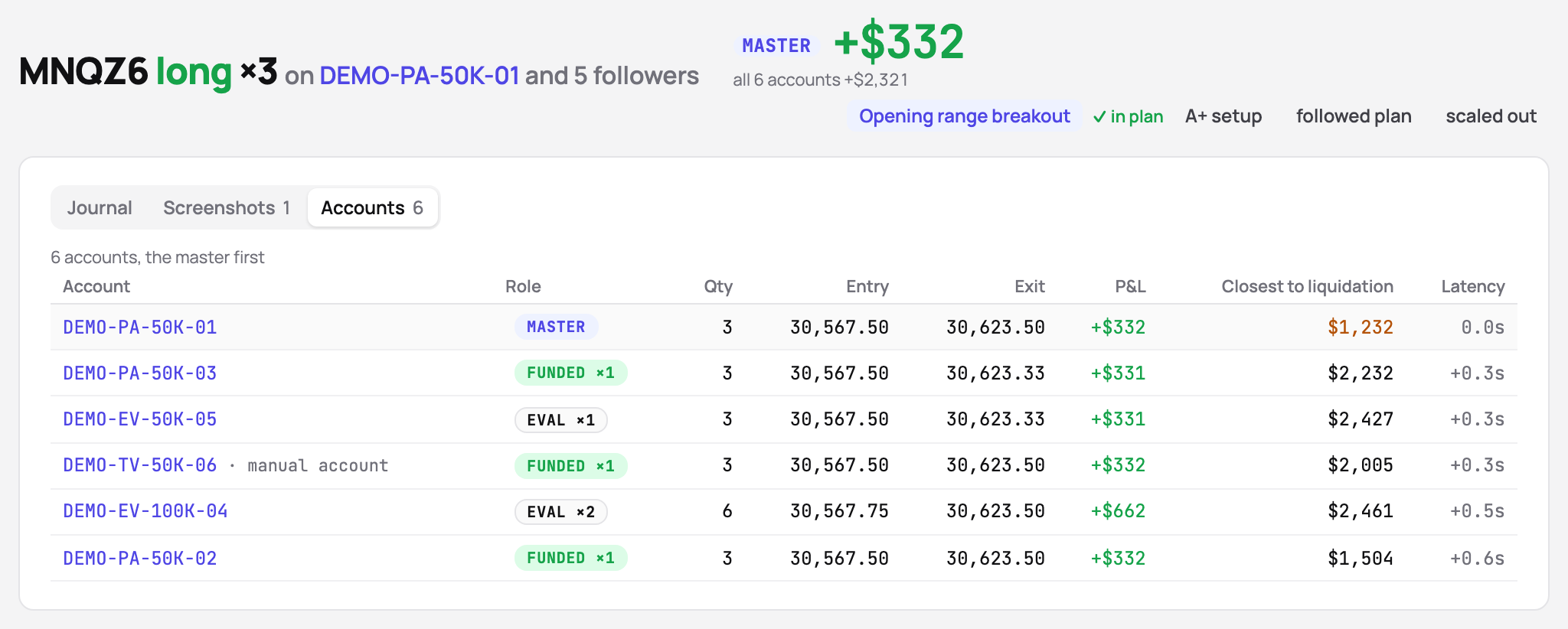
When you want every account’s trade instead, the Show switch in the filter bar goes from Master only to All accounts. With one account chosen in the filter you see that account’s own trades, as its firm sees them.
Let the fills tell you who copies whom
You do not have to set twenty roles by hand. TakeJournal looks at the last 90 days of a connection’s accounts: an account that repeats another’s fills within seconds, at a steady size, is proposed as its follower at that size, and the account whose fills come first as the master. The Copy trading… dialog on the Accounts page shows every account in use with its proposed role and size, and why, in numbers: how many of the master’s fills it repeated, at what size, how fast. Change what is wrong, save once, and the roles are set; the message that confirms it offers Undo.
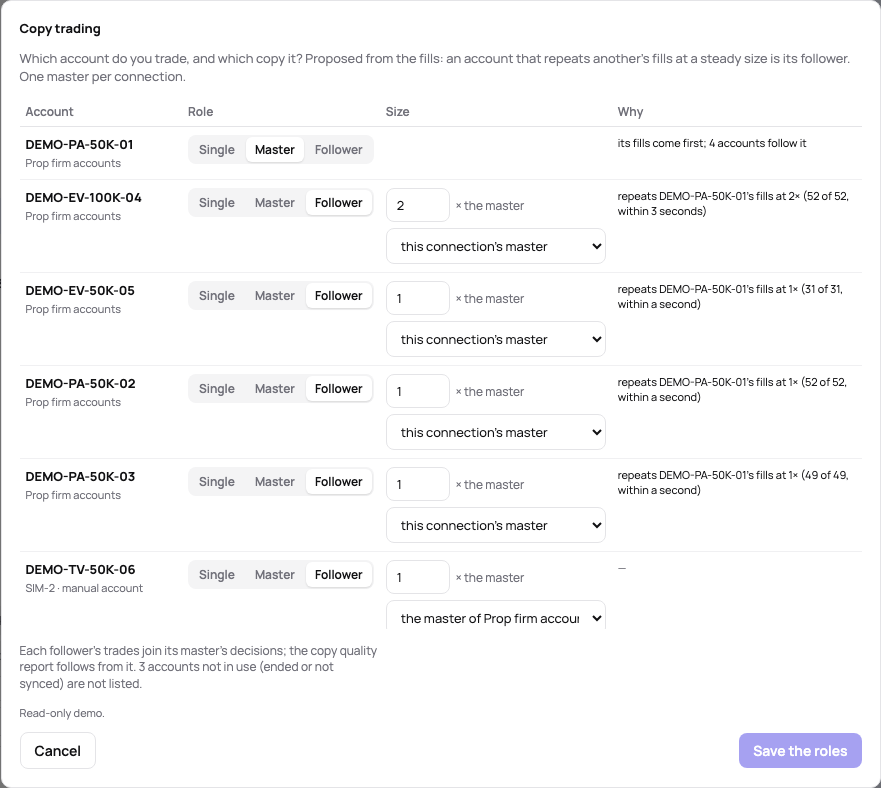
When a later sync brings accounts that copy another and have no role yet, a bar on the Accounts page names them, so a new evaluation you bought last night does not quietly become a trade of its own.
Followers on another platform
A copier often reaches further than one login: the master in NinjaTrader, followers at Topstep through TopstepX, more followers on Tradovate accounts whose fills come in as files. Each such follower has to say whose master it follows, in the same Copy trading… dialog: the role, the size, and the master it copies. Saving regroups at once, the past trades included, and from then on every sync and every imported file joins the follower’s trades to the master’s.
A follower that did not join shows as a row of its own next to the master’s trade, with the same instrument, direction and time and “1 account”. The usual cause is a follower that still says it follows “this connection’s master” while it sits on another login; the Accounts page marks it no master.
Followers on another connection come with the Pro and Fleet plans; followers on the master’s own login work on every plan that holds several accounts (pricing).
Journal it once
The note, the tags, the checklist, the rating and the screenshots go on the decision, once. If you set the roles after weeks of journaling account by account, nothing is lost: when trades join, their notes are appended, their tags, checklist answers and screenshots are added, and the rating or the strategy fill in only where the joined trade had none.
That is the point of the whole exercise. A review of the week reads five decisions with five notes, not two hundred rows of which five carry a note.
Still see what each account did
Folding the accounts under one trade does not hide them. The trade’s page has an Accounts tab (the picture above) with every account’s entry, exit and result, the closest it came to its liquidation level, and the latency: how far behind the master the follower filled.
On Pro and Fleet, every trade also carries the copy audit:
- missing — an account that was trading did not take this trade;
- size differs — a follower’s size does not match its copy size;
- no master — the followers traded but no master’s trade anchors them.
A follower that exits earlier than the master, at the first target or at break-even, gets no warning: that is risk management, not a copier fault, and the Accounts tab shows each exit anyway.
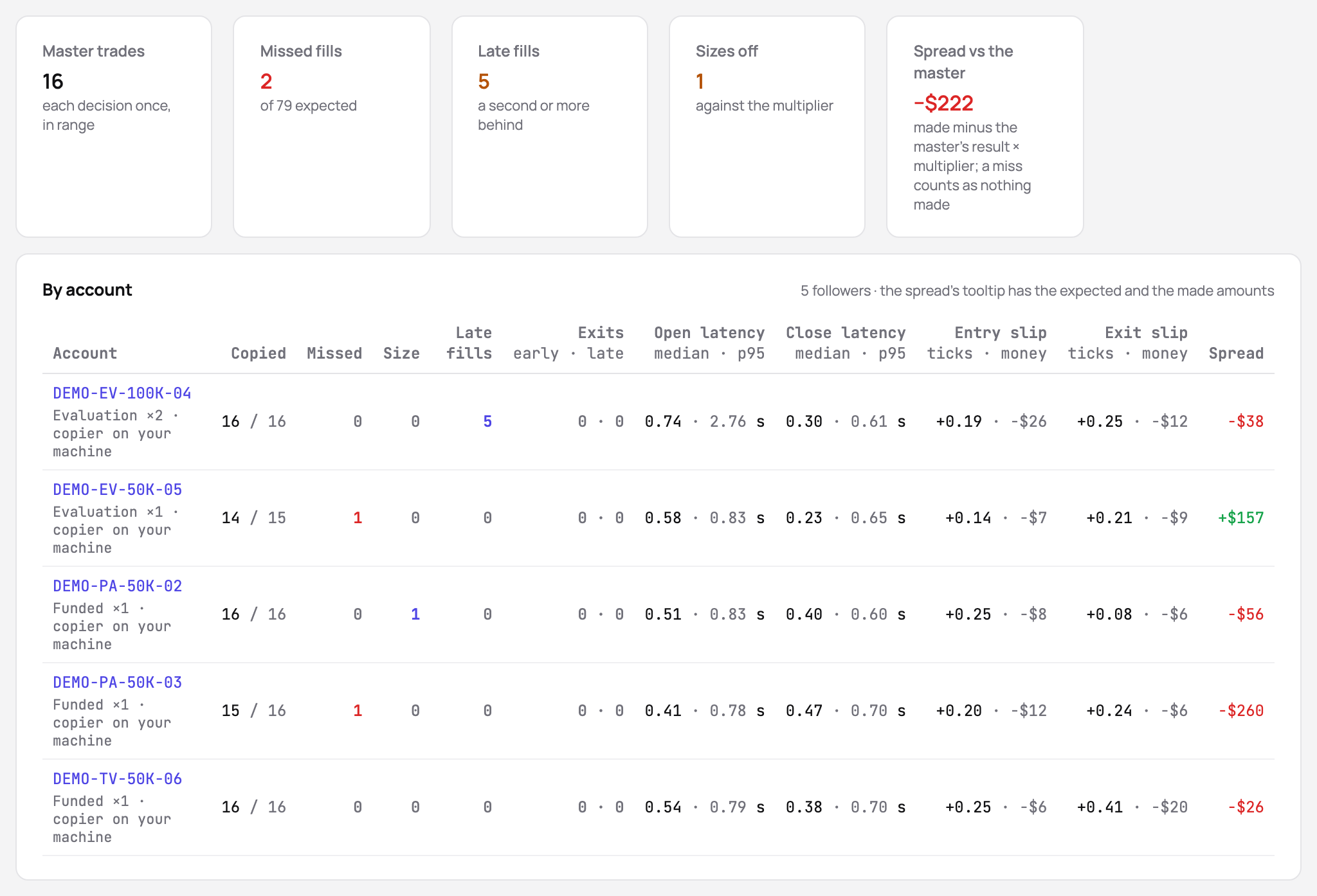
Over a month, the Copy quality page (Pro and Fleet too) says which account misses fills, which one fills late, and how far each follower’s results drift from what it should have made. That is the place to catch a copier that has started to lag before it costs you an account.
A routine that holds at twenty accounts
- Connect or import every account, master and followers.
- Open Copy trading… once, check the proposed roles and sizes, save.
- Journal each decision on its trade: the note, the tags, a screenshot.
- Look at the warnings of the copy audit when a trade shows one; once a week, look at Copy quality.
- When you add accounts, set their roles from the bar that names them.
The result is a journal that reads like your trading: one decision at a time, with every account it touched one click away.
AI odpowiada na podstawie naszego przewodnika: jak działa TakeJournal, importy, konta w firmach prop, plany.
Twoje pytanie trafia do Anthropic, aby uzyskać odpowiedź. Przechowujemy rozmowę przez 30 dni, aby ulepszać przewodnik, a potem ją usuwamy. To nie jest doradztwo inwestycyjne. Polityka prywatności