API keys: your journal in your own scripts
Pro and Fleet.
TakeJournal’s API lets your own scripts, spreadsheets and coding tools read your journal: the accounts, the trades as the Trades page shows them, an account’s fills, the dashboard’s statistics and groupings, a day or a week with its notes. It only reads: nothing it does changes your journal or reaches your broker.
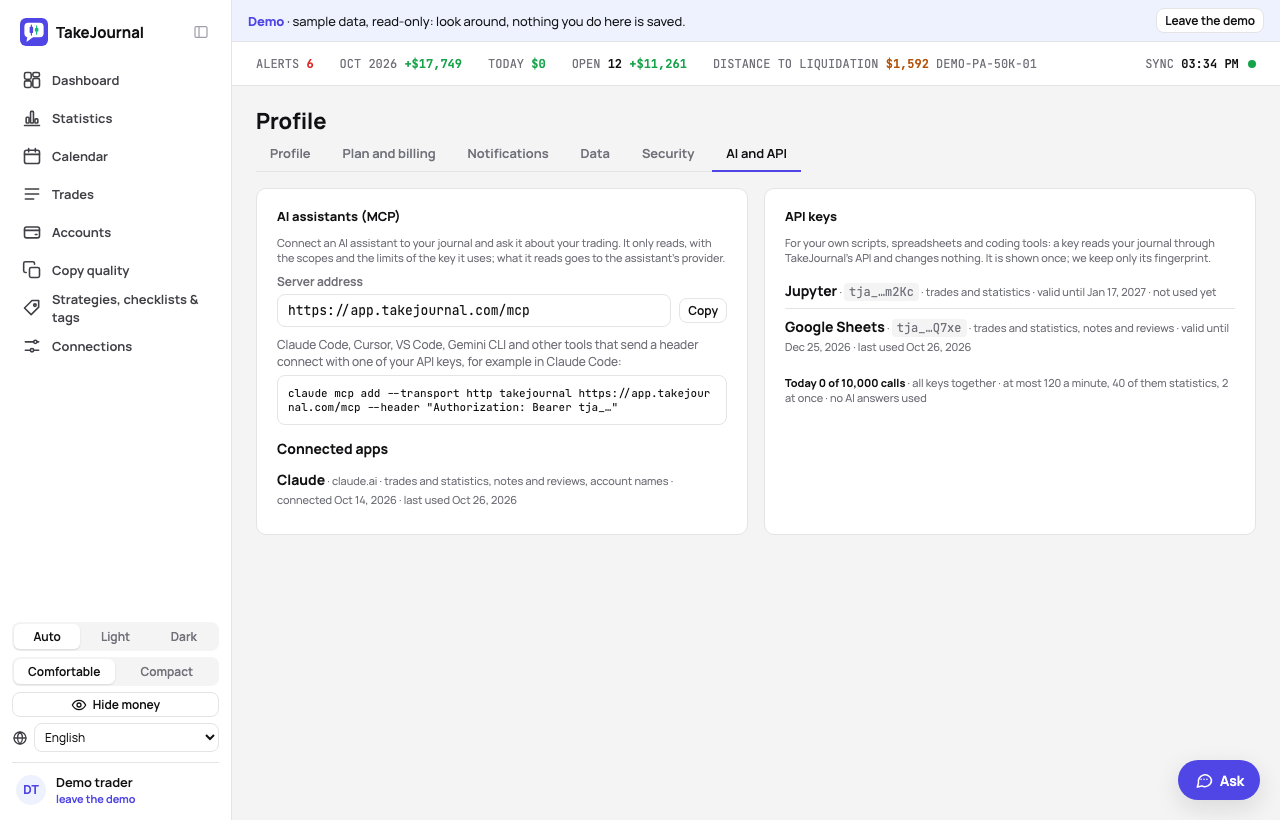
Making a key
Section titled “Making a key”Profile → AI and API → + New key: give it a name you will recognise, choose what it may read and for how long
(30, 90 or 365 days), then Create key. The key (tja_…) is shown once, with a call to try it: keep it in your
password manager or your script’s secret store. TakeJournal keeps only its fingerprint, so a lost key cannot be shown
again: make a new one. At most ten keys at a time.
What a key reads
Section titled “What a key reads”Every key reads the accounts, the trades, the fills and the statistics. Tick Notes, the day journal, AI reviews and Spotter’s messages for a key that should also read what you wrote; without it, these are left out of every answer.
Calling the API
Section titled “Calling the API”Send the key in the Authorization header:
curl -H "Authorization: Bearer tja_…" "https://app.takejournal.com/api/v1/trades?from=2026-10-01"| Call | What it answers |
|---|---|
GET /api/v1/me |
the plan, the profile’s time zone, currency and language, the key’s scopes and expiry, today’s calls |
GET /api/v1/accounts |
the accounts with their id, alias (ACC-12), name, number, currency and state |
GET /api/v1/trades |
the trades (a decision copied to several accounts counts once), filtered and paged |
GET /api/v1/trades/{id} |
one trade with its journal and its trade on each account |
GET /api/v1/statistics |
the dashboard’s statistics |
GET /api/v1/groups?by=weekday |
the trades grouped by one or two properties |
GET /api/v1/days/{date}, GET /api/v1/weeks/{date} |
a day or a week with its notes, its AI review and Spotter’s messages |
GET /api/v1/labels |
the tags, the categories and the strategies |
GET /api/v1/accounts/{id}/fills |
an account’s fills, oldest first, in UTC |
The filters are the Trades page’s: from and to as trading days (YYYY-MM-DD), account by id or alias, symbols,
strategy, tags, account_kind, market; lists are comma-separated. limit and offset page the trades. Times are
in your profile’s time zone unless a call says UTC. Every parameter of every call is in the API’s
description (OpenAPI), which needs no key.
Limits
Section titled “Limits”All your keys together: Pro 60 calls a minute, 20 of them statistics or groupings, 5,000 a day; Fleet 120, 40 and
10,000; two at once. A call over a limit answers 429 with Retry-After, the seconds to wait; the day counts in UTC.
The calls use none of your AI answers. Profile → AI and API shows today’s calls.
Revoking a key
Section titled “Revoking a key”Revoke beside the key, then confirm: scripts using it get 401 at once. A key also stops when it expires. If your
plan no longer has the API, its keys answer 403 until it has it again; they need not be made anew.
The AI answers from our guide: how TakeJournal works, imports, prop accounts, the plans.
Your question goes to Anthropic to be answered. We keep the conversation for 30 days to improve the guide, then delete it. No investment advice. Privacy policy