Fees, payouts and the lineage of an account
Trader plan and above.
The ledger
Section titled “The ledger”Every account’s page has its ledger, Costs & payouts on an evaluation or a funded account and Deposits & withdrawals on the others: evaluation fees, subscriptions, the activation fee, payouts, deposits and withdrawals, transfers between your own accounts, and the broker’s credits and debits (a correction, a reset, interest, a fee taken from the account), each with a date and a note. The account’s cash net is what you received minus what you paid, next to the trading result, and a subscription moves the account’s renewal a month after the day it was paid. + Add opens a new row with the payment the account usually has (a payout on a funded account, the subscription on an evaluation, a deposit on an account of your own), the others one choice away; Enter adds it, Esc cancels it. The same fee on many accounts at once, a month’s subscriptions for example, goes in through the Accounts page’s bulk edit: Account settings.
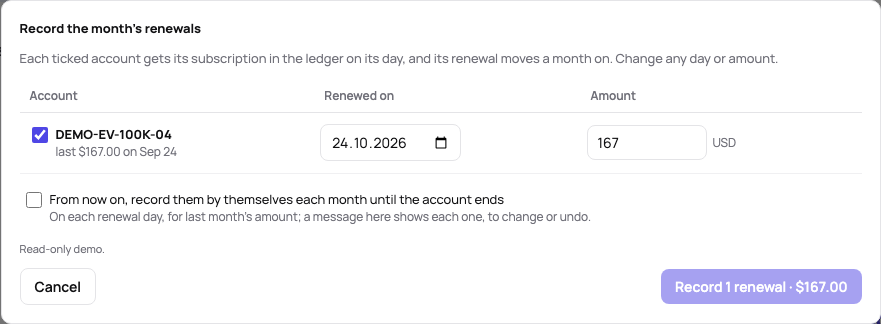
Subscriptions that renew are recorded in one step. On the renewal day the Accounts page says so in a bar — 2 subscriptions renew today · Apex 50K #1, Apex 50K #2 · $35.00 each, as last month — with Record the renewals… and Later, which hides it on this device until the next day. The dialog lists each account due, ticked, on its renewal day for last month’s amount: untick one you cancelled, change a day or an amount the firm charged differently, and Record 2 renewals · $70.00 puts them in the ledgers and moves each renewal a month on, with one Undo. Ticking From now on, record them by themselves each month until the account ends makes them repeat, as your choice only: on each renewal day the subscription goes into the ledger for last month’s amount (a month already missed at once), and a bar on the Accounts page shows each one with Change… for another day or amount, Undo, which also stops the account’s repeating, and OK once seen. An account that ends or is paused stops repeating.
A payout is a request with its course. Once a funded account’s payout rules are met, its page says so under the figures — A payout can be asked for · up to $1,250 — with Record the request… (the day, the amount, a comment such as the ticket number). The card Payout of $1,250 follows it in three steps, each with its day: the firm’s answer — Approved… takes the amount off the balance that day, and the payout rules start a new period from it; Rejected… keeps the day and the reason, the balance stays, and Request again… starts a new request — and Money arrived…, the amount that really came after the firm’s split and the bank’s fees, which counts in the cash net. A comment can be added or changed at any step. The ledger shows the payout as one row: what was received of what was approved, with the days. On a synced account the drop seen in the broker’s balance approves the open request by itself. An account of your own has the same course for its money: Withdrawal… in the ledger’s header (requested, processed off the balance, arrived in the bank, perhaps a fee less) and Deposit… (sent from your pocket, credited to the balance); a funded account’s ledger starts a payout with Payout request… too. Movements a source reports, an exchange’s or an import’s, arrive complete.
What moves the balance
Section titled “What moves the balance”Deposits, transfers in and credits raise the account’s balance; withdrawals, payouts, transfers out and debits lower it. The ledger’s Balance column shows what each did. Fees are paid from your pocket, not from the account, and leave the balance as it is; transfers, credits and debits count in the balance only, so the cash net stays the money between you and the account.
A Reset is an evaluation’s new attempt (or a simulated account’s fresh start): it sets the balance back to the amount you give it, the start balance when you pick the payment, and the trailing drawdown starts again from there, as the firm’s does. The firm’s rules count the trading days and the best day of the new attempt only; the trades before it stay in the journal. A funded or live account has no reset. Failed… on the account’s page records a reset with its fee (Reset fee, paid from your pocket) as one entry, the fee next to the reset; editing or deleting the entry takes the fee along.
Without a balance from the broker, the balance on the account’s page is the start balance, the result of the closed trades and these movements, and the equity curve steps on their days (its tooltip names the money moved). With a balance from the broker, as Rithmic reports it, the curve puts a payout on its day instead of spreading it over the trades, and the closest approach to liquidation of the trades after it counts it.
Deleting a movement shows Undo for a few seconds.
Amounts are in the account’s currency. A movement a source reports in another currency or in coins (a USDT deposit on an account in euros) shows what moved next to it and counts at its value in the account’s currency on its day.
Movements from the sources
Section titled “Movements from the sources”A movement a source reports, a sync or an import, says where it came from next to its payment. One that matches a movement you typed in, the same direction and amount at most seven days apart, takes your row over: your payment and note stay, the date and the amount become the source’s, so nothing counts twice. A deleted movement of a source stays deleted: the next sync does not bring it back.
Rithmic and TopstepX keep no history of deposits and payouts, only the account’s balance, which every sync reads. When the balance moves between two syncs by more than the trades closed in between explain, the difference goes into the ledger as a movement seen in the balance: a drop on a funded account as a payout, on a live account a withdrawal (a rise a deposit), on an evaluation or a simulated account a debit or a credit, or a reset when the balance lands on the start balance. Change its payment when the guess is wrong, and add a note. A payout seen in the balance is already in the ledger: there is no need to type it in. Nothing is written while a position is open or a trade has just closed, when the balance cannot be told apart from trading, and nothing from before the first sync that read the balance.
The crypto exchanges’ keys bring their deposits, withdrawals and transfers with each sync, from the whole history the exchange keeps on the first one (crypto). An import brings them from a file: Kraken’s ledger export is known by its columns, any other statement of deposits and withdrawals is mapped like any export, and reverting the import takes its movements away again (one it took over is as you typed it).
Dividends
Section titled “Dividends”On a stock account the ledger also holds the dividends paid on your shares and the withholding tax taken from them, each with the symbol of its shares. Interactive Brokers (its Dividends, Payment In Lieu Of Dividends and Withholding Tax, through the connection or a Flex Query file), tastytrade, Trading 212 and SnapTrade bring them with each sync, an imported statement brings them where its type says dividend or withholding, and + Add takes them by hand: pick Dividend or Withholding tax and type the symbol. A dividend raises the balance and its tax lowers it; neither is money between you and the account, so the cash net stays as it is.
A dividend belongs to the trade that held the shares: the long trade of the same account and symbol held on the dividend’s ex-date (bought before it and not sold before it) where the source gives the ex-date, else open on the day it was paid. Its row in the ledger links that trade; when no trade held the shares, the row says no trade held and the dividend counts in the balance only. The trade’s page shows Dividends, net of the tax, with the payments, and P&L with dividends beside the price P&L, which stays the trading result.
The statistics, the strategies, the equity and the calendar count the trading result, and the dashboard’s Net P&L names the filtered trades’ dividends apart (dividends +$77.35 apart). The filter Dividends, under + Add filter once your journal has shares, counts them in: in the result adds each closed trade’s dividends to its P&L wherever it counts; an open trade’s stay on its page until it closes.
The lineage of an account
Section titled “The lineage of an account”A funded account comes from an evaluation, and a replaced account from the one before it. On a passed or replaced account, The account that took over… in the Account card’s ⋯ names the successor and the day (the day the account ended, else its last trade’s); a passed account without one asks for it in the card. The old account stops syncing and leaves the plan’s account limit (its trades stay), and the successor’s ledger and cash net include the whole chain’s fees and payouts, so a funded account shows what it really cost to get there.
Related
Section titled “Related”Account settings and the distance to liquidation · Rithmic: choosing the synced accounts
The AI answers from our guide: how TakeJournal works, imports, prop accounts, the plans.
Your question goes to Anthropic to be answered. We keep the conversation for 30 days to improve the guide, then delete it. No investment advice. Privacy policy