Ask your journal (the AI chat)
Questions about using TakeJournal on every plan; questions about your own trades on Trader and above, one AI answer each.
Ask at the bottom right of every page (or ⌘ J, Ctrl J on Windows and Linux) opens a chat that answers two kinds of question:
- How do I… — how to import a platform’s export, connect Rithmic, set up a prop account, what a figure means. The answer comes from this guide, in your language, and links the section it rests on.
- Questions about your trades — “What is my win rate after a losing trade?”, “Which setup works best on Mondays?”, “How much did my mistakes cost in September?”, “Which account is closest to its payout?”. The chat reads your journal through the same statistics the dashboard shows, quotes the figures and links the trades, days and accounts they come from. A link opens the page in the app; the conversation stays where it was.
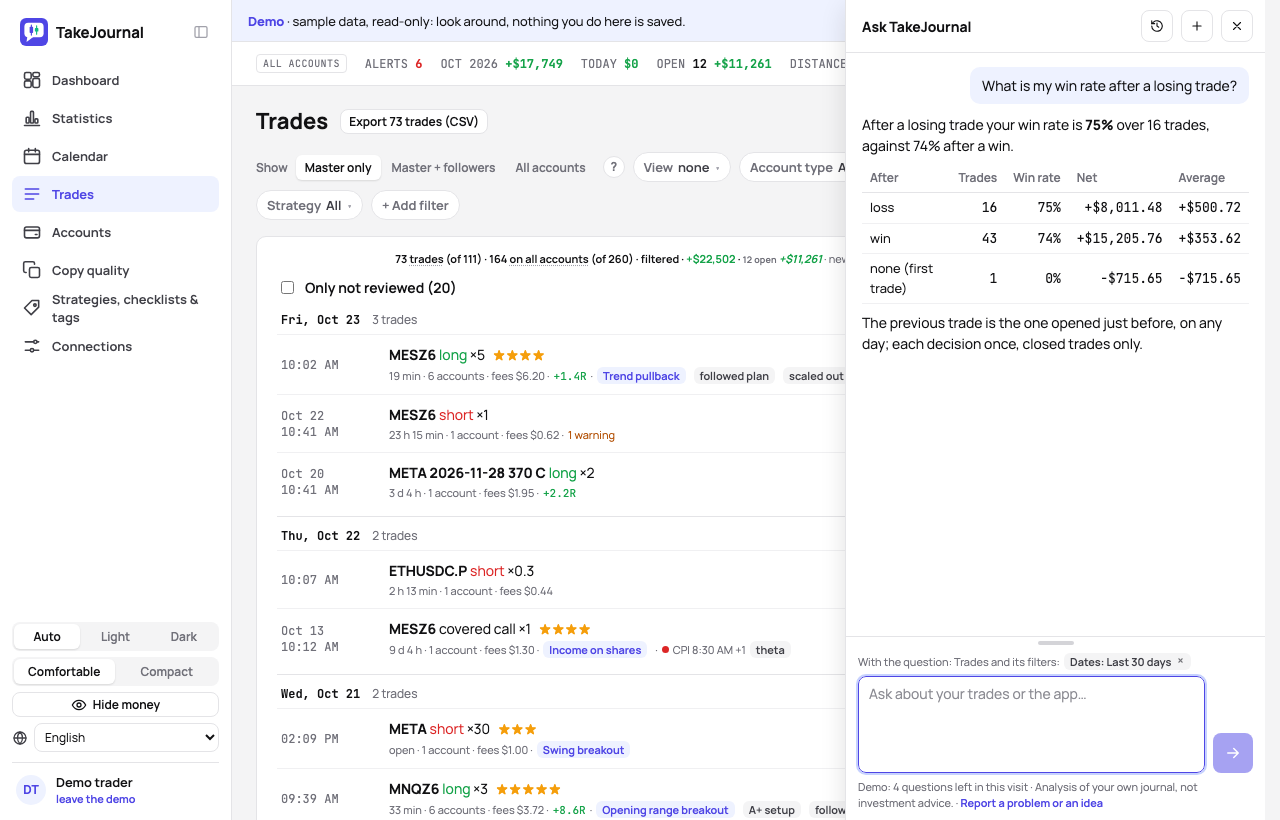
The page you ask from
Section titled “The page you ask from”A question goes with the page you are on and its filters (the line above the question field says so): “this month” on the dashboard filtered to evaluation accounts means those; “this trade” on a trade’s page means that trade. A question that names its own period or accounts is answered for those.
What it can and cannot do
Section titled “What it can and cannot do”The chat reads: the statistics with every filter of the dashboard (dates, account or type of accounts, market, symbols, strategy, tags, checklist), the trades, each decision once or every account’s, a trade’s journal (notes, plan, R, checklist, tags, rating, calm, its followers), a day’s or a week’s notes, and the accounts with their balance, distance to liquidation and firm rules. It groups trades by the weekday, the hour, the month, the symbol, the strategy, a tag, the rating, calm, the duration, the trade of the day or the result of the trade before.
By itself it changes nothing: the changes below wait for your click, and for anything else it tells you where in the app to do it. It analyses your own past trades and gives no investment advice, signals or forecasts. Every figure it quotes comes from your journal in that answer; when the journal cannot answer, it says so. It answers in the language you write in.
Changes it proposes
Section titled “Changes it proposes”Ask the chat to tag trades (“tag my trades of this week entered within 15 minutes after a loss as revenge”), to suggest your daily rules from your history, or to write a day’s note from its trades: it shows the change as a card under its answer, with the trades and the tags, the rules or the note it would write. Nothing is saved until you click Apply: the rules are saved as you tick them, the note as you edit it, and Cancel leaves everything as it is. An applied change can be undone from the card, or for 30 days in Recent changes, unless you changed the same thing since.
A proposal is part of the answer that made it and costs no extra AI answer; applying it calls no AI. Proposals need the Trader plan or higher, like questions about your trades. If you would rather the chat only answer, switch The chat may propose changes off in Profile › Notifications, under AI and news. The demo shows the cards and saves nothing.
Plans and AI answers
Section titled “Plans and AI answers”On every plan the chat answers questions about using TakeJournal, free. Questions about your own trades need the Trader plan or higher; an answer that read your journal costs one AI answer of the plan’s (Trader 100 a month, Pro 250, Fleet 600, the 7-day trial 10 in all), the same as the AI import, with no limit a day. The guide’s answers are free, within a fair number a day. The line under the question field shows what is left; with the month’s answers used up, the chat still answers from the guide. The demo answers five questions a visit about its sample journal.
On this web site, without an account, Ask at the bottom right of every page answers questions about TakeJournal from this guide, in the language of the page: five questions per visitor, within a number of answers a day for all visitors together. It knows no journal; your own trades are the app’s chat’s, once you have an account. Each conversation is kept for 30 days after its last question so that we can improve this guide, then deleted (privacy policy).
Report a problem or an idea
Section titled “Report a problem or an idea”Tell the chat that something does not work, or what would help you, and ask it to let the team know: it asks for what is missing (what you did, what happened, what you expected), shows you in a line or two what it will send and sends it once you agree, with the page you are on, its filters and the app’s version, and gives you a reference. Report a problem or an idea under the question field does the same without the chat: what it is, a problem or an idea, and your words. Only the TakeJournal team reads the reports; sending one costs no credit, and a few a day go through. The demo shows the form and sends nothing.
What is sent, and how long it is kept
Section titled “What is sent, and how long it is kept”The chat runs on our AI provider’s model. With your question go the page and its filters and what the chat reads
to answer: figures, trades with their notes and tags, day and week notes, the accounts’ kinds, firms and balances.
Account numbers and names are replaced by placeholders (ACC-12) before anything leaves the server and are shown
again in the answer. The AI provider does not use these requests to train its models and does not keep them after
answering (privacy policy).
Your conversations are kept for 12 months after their last question so you can go back to them (the clock icon in the chat’s header); delete one or all of them there at any time.
The AI answers from our guide: how TakeJournal works, imports, prop accounts, the plans.
Your question goes to Anthropic to be answered. We keep the conversation for 30 days to improve the guide, then delete it. No investment advice. Privacy policy