Your first ten minutes
Every plan.
1. Look around first
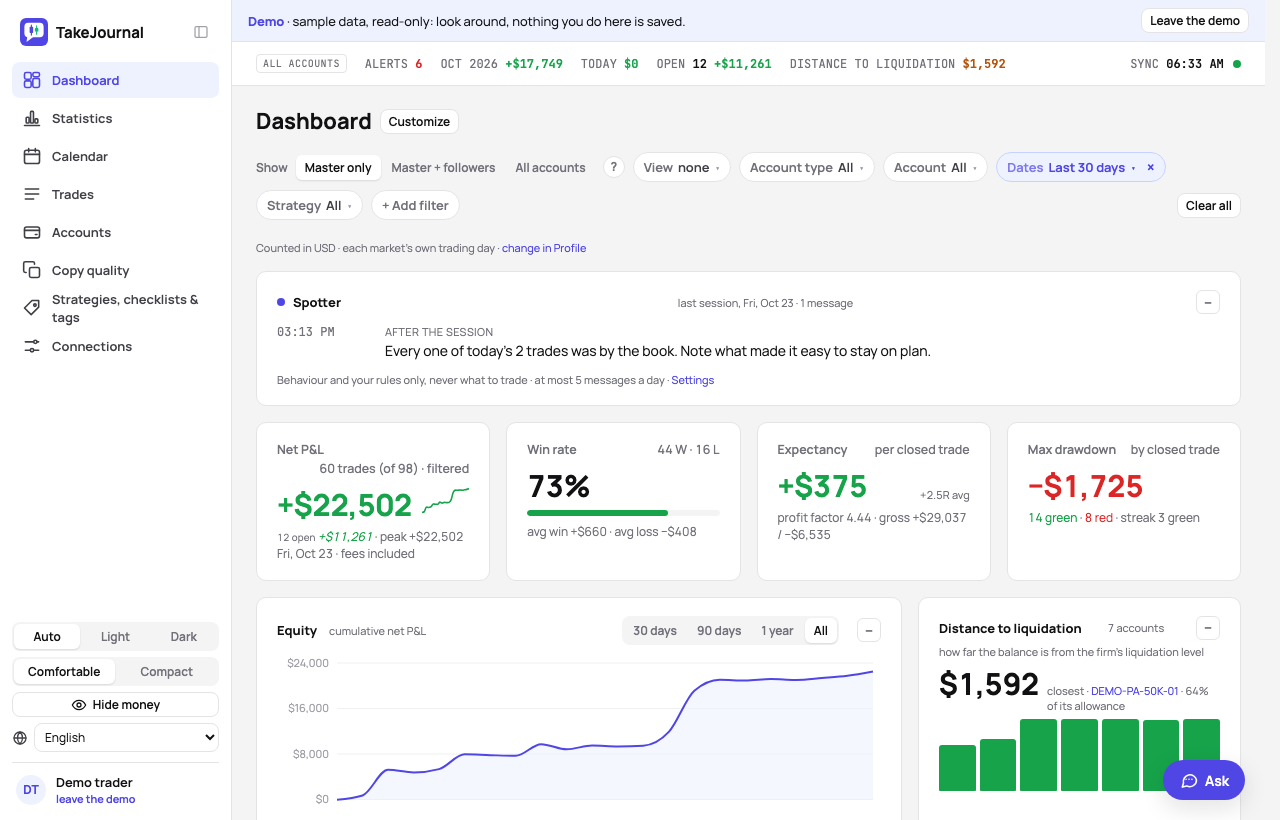
Section titled “1. Look around first”The demo signs you in as a shared demo trader with sample data: six prop accounts following one master (one of them fed by Tradovate files), three passed evaluations, stocks, options, crypto and forex, notes, tags and charts. Nothing you do there is saved, and you need no account. Click through the dashboard, a day in the calendar, a trade.
2. Sign up
Section titled “2. Sign up”Start free with an e-mail address or a Google account; the name is optional and the password has at least 8 characters. Creating the account agrees to the Terms of Service and the Privacy Policy; the box Don’t send me product news and offers by e-mail refuses those mails, and Profile → Notifications changes it later. A Google account signing in for the first time from the sign-in page is asked the same once, before the app opens. The page after it names the address the confirmation link went to: Send the link again when it does not come, Wrong address? Change it to fix a typo. Every new account starts on the Free plan, with no card and no time limit: trades typed in by hand, every figure of the journal. Free imports one file a day too. A 7-day trial of the Pro plan is yours once: it starts with the first way in that needs it (a broker, on the Start here card or the Connections page), or from Profile → Plan and billing.
3. Where your trades come from
Section titled “3. Where your trades come from”The first dashboard has no figures yet, only a Start here card with the ways in. Pick one; the others stay open.
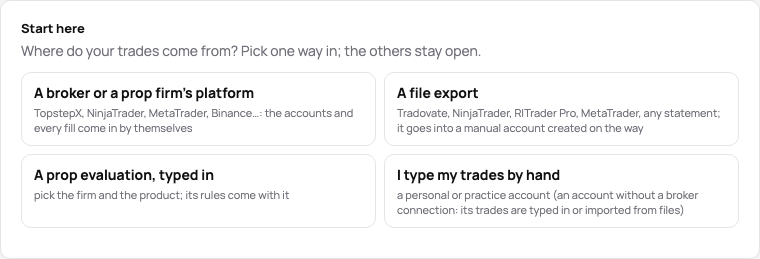
- A broker or a prop firm’s platform (Trader and above): the new account’s wizard; a firm synced through Rithmic or TopstepX asks for your login there, an exchange or another broker leads to the Connections page. Every fill of every account behind the login arrives on its own. How →
- A file export (every plan; Free one file a day): an export of NinjaTrader 8, Tradovate, R|Trader Pro, Bookmap, MetaTrader, cTrader or any broker. The file is read first: its manual account is proposed from it — the account number as the name, the firm its number names, the product to confirm — and one button creates it and imports; the next export of that number goes into it. How →
- A prop evaluation, typed in (every plan): the wizard’s firm, product, start and fee; the product’s rules come with it. How →
- I type my trades by hand (every plan): a manual account, then the New trade dialog: the instrument, the direction, the size, the open and the close. How →
A way your plan does not include says so on its tile: the first you pick starts the trial and goes on; once the trial is used, the tile leads to the plans.
The same ways stay on the Connections page, the Accounts page (New account, Import a file), and New trade is in the header of the pages with trades.
4. The screens
Section titled “4. The screens”- Dashboard — the results of the period you filter (the filters are the chips under the title), the distance to liquidation of every prop account, the breakdowns.
- Calendar — every day and week with its result and notes.
- Trades — the list, each decision once or every account’s trade, with the filters, the bulk edit and its undo, and the CSV export.
- Accounts — every account with its distance to liquidation, its settings, fees and payouts.
- Copy quality — each follower against its master; it appears once an account is a master or a follower.
- Strategies, checklists & tags — the setups you trade with their checklists, and the tags in their categories.
- Connections — the broker logins, each one row with its state and Sync now; its arrow opens the rest (Test login, Edit, Delete connection, the add-ons’ steps); and the sync history with every run’s report.
Every word of our own — master and follower, the manual account, the distance to liquidation — is explained in one line where it first appears, and in The words TakeJournal uses.
5. Make it yours
Section titled “5. Make it yours”The sidebar collapses to a rail of icons with the button next to the name or with ⌘ \ (Ctrl+\ on Windows), and remembers it. Under the sections, Auto / Light / Dark follows your system or pins a theme, and Comfortable / Compact sets how much fits on a screen. Each section has a keyboard shortcut, shown when you point at it: press g, then d for the dashboard, c for the calendar, t for trades, a for accounts, s for strategies, n for connections; ? lists every shortcut. Ask (⌘J) opens the chat that answers from the guide and from your own trades.
On the Profile page: your time zone (the times of every trade), the currency your figures are counted in when your accounts differ and the forex day; its tabs hold the plan with the trial, the notifications, your data to take away and the sign-in.
6. One setting worth checking
Section titled “6. One setting worth checking”If your broker does not report commissions per fill, a standard rate per contract applies to every P&L (the Accounts page shows the fees of each trade); write to support if your rate differs.
Related
Section titled “Related”Rithmic: connect and sync · Master and followers · The words TakeJournal uses · Pricing
The AI answers from our guide: how TakeJournal works, imports, prop accounts, the plans.
Your question goes to Anthropic to be answered. We keep the conversation for 30 days to improve the guide, then delete it. No investment advice. Privacy policy