Forex and CFDs
Every plan for trades typed in and for the statements of MetaTrader 4 and 5 and of cTrader (Free one file a day; MetaTrader and cTrader).
Forex sits next to futures, stocks, options and crypto in the same journal: the same lists, calendar, statistics, checklists and AI reviews. One kind, Forex / CFD, covers the currency pairs, the metals and the index, energy and stock CFDs the same brokers offer; the Market filter has Forex / CFDs for all of them.
Symbols
Section titled “Symbols”Type the symbol as your broker writes it. TakeJournal names a pair by its two codes, so EUR/USD, EUR_USD,
EURUSD.m and EURUSDpro are all EURUSD; gold is XAUUSD (GOLD too), silver XAGUSD; a CFD keeps its name
without the broker’s suffix (US30.cash is US30, GER40, NAS100, #AAPL is AAPL). The same index under two
brokers’ names (GER40 and DE40) is two symbols for now. The statistics file every trade under its symbol.
Lots, the contract and the quote
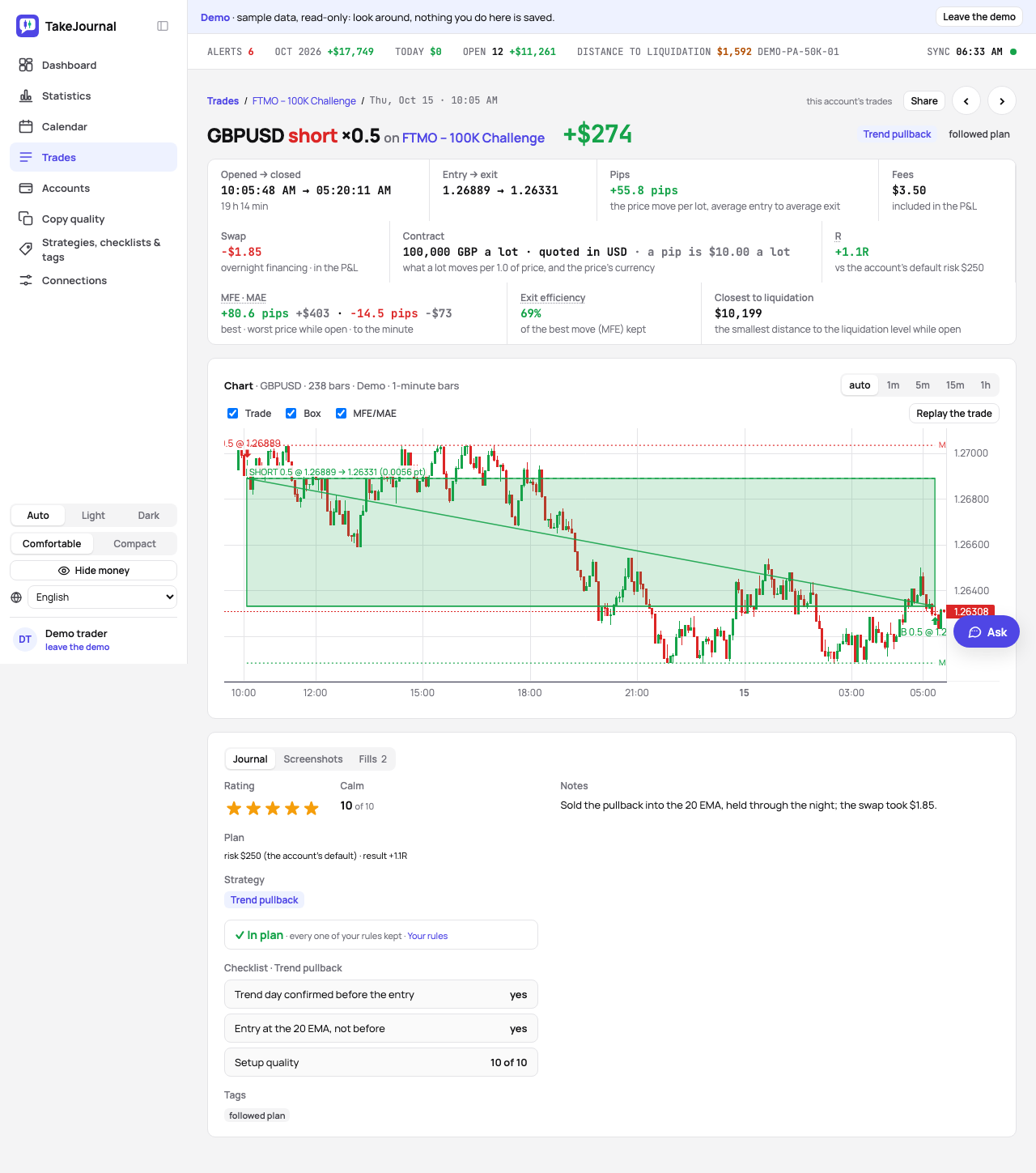
Section titled “Lots, the contract and the quote”Sizes are lots with two decimals (0.01 is a micro lot). What a lot is comes from the symbol and is shown in the dialog while you type: 100,000 of the base currency on a pair, 100 troy ounces of gold, platinum or palladium, 5,000 of silver, 1 on an index or any other CFD unless your broker says otherwise. The quote currency the price moves in follows too: a pair’s second code, dollars on the metals and the US indices, euros on the European ones, pounds on the UK 100, yen on the Nikkei; a stock CFD takes the account’s currency. Both are editable when you type the first trade, and later on any trade’s page (Contract), where a change counts every trade of the symbol anew.
The result is the price’s move × the contract size × the lots, in the quote currency, converted into the account’s at the European Central Bank’s rate of the day the trade closed where the two differ (a yen pair or a DAX CFD on an account in dollars). A currency pair’s move shows in pips (0.0001, or 0.01 with a yen quote): the price’s move from the average entry to the average exit, whatever the lots (26 pips on half a lot read 26.0 pips; the money carries the lots); a metal or a CFD shows the points of its price the same way. Prices take the digits your broker quotes (1.08453, 149.802).
Swap and commission
Section titled “Swap and commission”The swap (overnight financing) is a cost of its own, apart from the commission: type it with the close, negative when paid and positive when received, and it is booked on the closing fill. The trade’s page shows it next to the fees, the Fills tab has a column for it, and it counts in the result and among the costs of every figure. The commission is typed as on any trade, in the account’s currency, in total.
The trading day
Section titled “The trading day”A forex day runs from 17:00 New York time to 17:00 the next day and is named by the day it ends, as the daily candle of nearly every MetaTrader broker and the week’s open and close: a trade at 19:00 ET on Monday is Tuesday’s, Sunday evening’s trades are Monday’s. The calendar, the statistics and the AI reviews date them so (see the calendar). If you run your day by the clock instead, Forex day on the Profile page switches forex to the calendar day of your time zone, as crypto is dated.
Open positions
Section titled “Open positions”An open currency pair of two currencies the ECB fixes is valued at the day’s reference rate, on every plan; a metal or a CFD at the price you type on the trade’s page (Current price). A trade of a connected broker (OANDA, Capital.com, IG, TradeLocker, MetaTrader 4 and 5 through TakeJournal’s program) draws the broker’s 1-minute bars on its page, with MFE and MAE to the minute (Charts, MFE and MAE); a trade typed in or imported from a statement has a chart only where such a connection fetched the bars of its symbol at its time, and otherwise takes MFE and MAE typed in by hand.
Typing a trade in
Section titled “Typing a trade in”New trade → Forex / CFD: the symbol, the direction, the lots, the open and the close with their prices, the fees and the swap in the account’s currency; the contract size and the quote are prefilled and editable. See trades by hand.
Statements and firm rules
Section titled “Statements and firm rules”The statements of MetaTrader 4, MetaTrader 5, cTrader and Match-Trader import as known formats, without the AI and without a credit, with the swap of each trade and the balance rows into the ledger (MetaTrader and cTrader). The rules of the forex firms (FTMO, FundedNext, FundingPips, The5ers, E8 Markets and Fintokei) are prefilled from their products (firm rules). DXtrade and TradeLocker statements are coming as known formats; until then they go through the mapped import.
The AI answers from our guide: how TakeJournal works, imports, prop accounts, the plans.
Your question goes to Anthropic to be answered. We keep the conversation for 30 days to improve the guide, then delete it. No investment advice. Privacy policy