Crypto: spot pairs and perpetuals
Every plan for trades typed in and imports (Free one file a day); the exchanges’ API keys from Trader up.
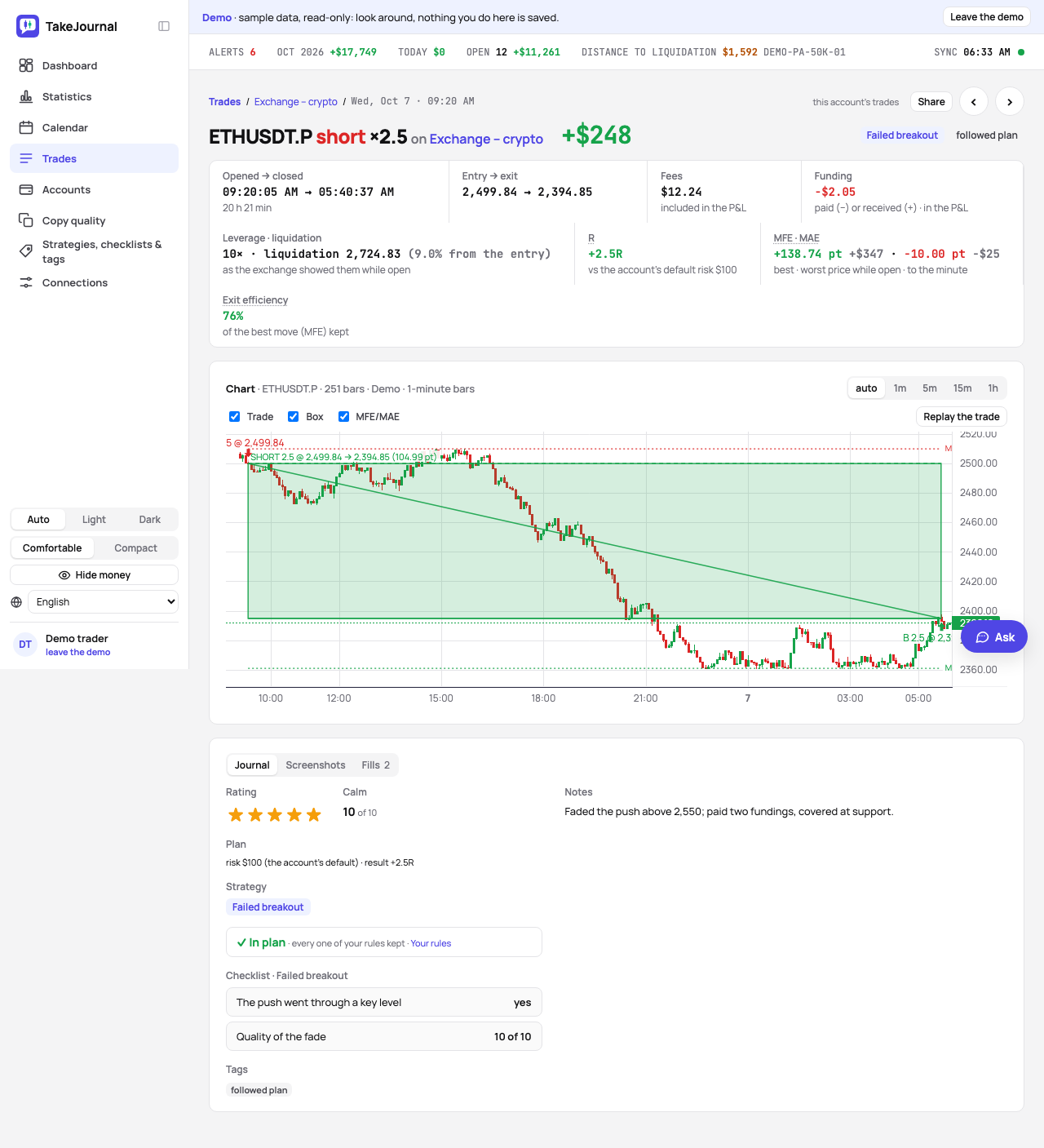
Crypto sits next to futures, stocks and options in the same journal: the same lists, calendar, statistics, checklists and AI reviews. A spot pair is bought and sold (BTCUSDT); a perpetual goes long and short with funding (BTCUSDT.P). The Market filter has Crypto for both. A trade of a connected exchange draws the exchange’s 1-minute bars on its page, with MFE and MAE to the minute (Charts, MFE and MAE).
Symbols, quantities and prices
Section titled “Symbols, quantities and prices”TakeJournal names a pair by its coin and its quote, whatever the exchange writes: BTC-USD, XBT/USD and XXBTZUSD
are all BTCUSD, so the same market from two exchanges is one instrument. A perpetual gets .P after it, as on
TradingView (ETHUSDT.P), because exchanges name the spot pair and the perpetual alike. The statistics file both under
the coin (BTC).
Quantities have decimals (0.015 BTC), prices the digits they need (0.00001234). A spot pair is held, never shorted.
Coins that came into the account from elsewhere, a deposit or a reward the exchange’s key reports, are a position of
their own on the coin in dollars (BTCUSD), opened at their value when they arrived. A sale on a dollar pair beyond the
coins TakeJournal saw bought there takes them, so the trade shows the price’s move since they came in; your round trips
on the pair stay trades of their own. Coins leaving the account close what came in, then the oldest position of the
coin on a dollar pair. A sale of coins TakeJournal never saw at all closes what is held and opens nothing, and a sale
on a pair quoted in euros or a coin does not take deposited coins.
Results in the account’s currency
Section titled “Results in the account’s currency”An account counts in its own currency: dollars unless you choose another, as for a Kraken account in euros. USDT, USDC and the other dollar stablecoins count as dollars. A pair quoted in another currency than the account’s (BTC/EUR on an account in dollars, BTCUSDT on one in euros) is valued at the European Central Bank’s reference rate of the day it closed (a weekend at Friday’s). A pair quoted in a coin (ETH/BTC) shows its result in points only. A fee charged in the coin bought, in BNB or in another currency is valued in dollars when the trade comes in, then in the account’s currency at the rate of its day. A buy paying its fee in the coin bought holds the coins the exchange credited, the quantity less the fee, so selling them all closes the trade.
An open position, bought or deposited, is valued at the coin’s hourly price from Binance’s public market data (a perpetual at the spot price, a euro pair at the day’s rate), on every plan; the trade shows the hour it is from. A price you type in on the trade’s page counts until the next hour’s. A coin Binance does not list keeps the price you type in.
Days around the clock
Section titled “Days around the clock”Crypto trades every day, the weekend included, so a crypto trade counts on the calendar day of your time zone (the one on your profile): a Friday-evening trade in New York stays on Friday. The calendar shows Saturday and Sunday when a month has trades on them. Futures keep their session (from 18:00 New York time), stocks and options New York’s day (see the calendar).
Perpetuals: funding, leverage, liquidation
Section titled “Perpetuals: funding, leverage, liquidation”Funding payments count in the result of the position that was open when they were paid, like fees: the trade’s page shows the funding next to the fees, and the Fills tab lists the payments. On an account you fill yourself, add a payment there (Add funding: the time and the amount in the account’s currency, negative when paid).
The leverage and the liquidation price are yours to note on any perpetual (Leverage · liquidation on the trade’s page); the page shows how far the liquidation price was from the entry.
Typing a trade in
Section titled “Typing a trade in”New trade → Crypto or Perpetual: the pair as the exchange writes it, the quantity, the open and the close with their prices, the fees in the account’s currency. See trades by hand.
An exchange’s export
Section titled “An exchange’s export”Accounts → the account → Import trades. Kraken’s trades export, Binance’s spot and USDⓈ-M futures trade history and Coinbase’s fills are recognised by their columns: no AI, no credit. Any other exchange’s file is mapped as any broker’s export. The preview asks, for every symbol that looks like a pair, whether it is a crypto spot pair, a perpetual or not crypto (the file’s kind decides the default), and files it under TakeJournal’s name.
An export from OKX, Bitget or Hyperliquid: choose the exchange under Where is the statement from and Map the statement. TakeJournal maps it for you on every plan, and once a few of its users have imported the same layout, it is recognised by its columns like Kraken’s.
A file of funding payments (Binance’s income history, a transaction log with funding rows) imports the same way: mapped by its column names, it adds the payments to the perpetuals of the account. Kraken’s ledger export is known by its columns too: its deposits, withdrawals, transfers and rewards go into the account’s ledger (its trades come from the trades export), and any other exchange’s statement of deposits is mapped like any export.
A read-only API key
Section titled “A read-only API key”Connections → Add connection: Kraken (spot), Binance (spot and USDⓈ-M futures), Bybit (spot and perpetuals of a Unified Trading Account) or Coinbase (Advanced Trade, spot). Make a key that can only read, as below for each exchange. Test login on the connection’s card says when a key may do more (Binance, Bybit and Coinbase tell it; Kraken does not): make a key that can only read and put it in with Edit.
A demo account. Binance and Bybit, and the exchanges through CCXT that have a demo or a testnet, ask in Account which account the key reads: the live one, or Demo or testnet with a key made there (at Binance and Bybit in their Demo Trading). The accounts carry it in their names, such as Bybit demo spot. Binance’s demo keeps no deposits or withdrawals, so only its trades come in.
Kraken
Section titled “Kraken”- On kraken.com, the account menu › Settings › API, Create API key.
- A name, such as TakeJournal. Of the permissions tick only Query closed orders & trades and Query ledger entries (the second for deposits and withdrawals; without it the trades still come). Leave every other box unticked: no orders, no deposits, no withdrawals.
- No IP restriction is needed. Generate key, then copy the API key and the Private key into the connection; Kraken shows the private key once.
Kraken does not tell an app what a key may do: check the ticks yourself.
Binance
Section titled “Binance”- On binance.com, the profile menu › API Management, Create API, System generated, a name and the security check.
- Of the API restrictions keep only Enable Reading, as Binance makes the key. Never tick Enable Spot & Margin Trading, Enable Futures, Enable Withdrawals or Permits Universal Transfer.
- Unrestricted IP access is fine for a key that only reads (Binance wants IP addresses before trading and withdrawals only).
- Copy the API key and the Secret key into the connection; Binance shows the secret once.
Binance gives a spot account’s trades pair by pair: TakeJournal asks the pairs of the coins you hold; name any others you trade in the connection.
- On bybit.com, the profile menu › API, Create New Key, System-generated API Keys.
- API Transaction, a name, and Read-Only permissions; never Read-Write.
- Without IP addresses Bybit keeps a key three months; then make a new one and put it in with Edit.
- Copy the API key and the API secret into the connection.
The account has to be a Unified Trading Account. Bybit EU’s customers (bybit.eu) choose Region: Europe (bybit.eu): a key made there works only on Bybit EU’s servers. Bybit EU offers spot alone, so the connection has no perpetuals account there.
Coinbase
Section titled “Coinbase”- On the Coinbase Developer Platform (portal.cdp.coinbase.com, signed in with your Coinbase account), API keys, Create API key.
- A name; in the advanced settings the portfolio you trade in, View only (never Trade or Transfer) and the ECDSA signature algorithm, not the Ed25519 Coinbase proposes.
- Create, then copy the key’s name (organizations/…/apiKeys/…) and its private key, with its first and last lines, into the connection; Coinbase shows them once.
The other exchanges
Section titled “The other exchanges”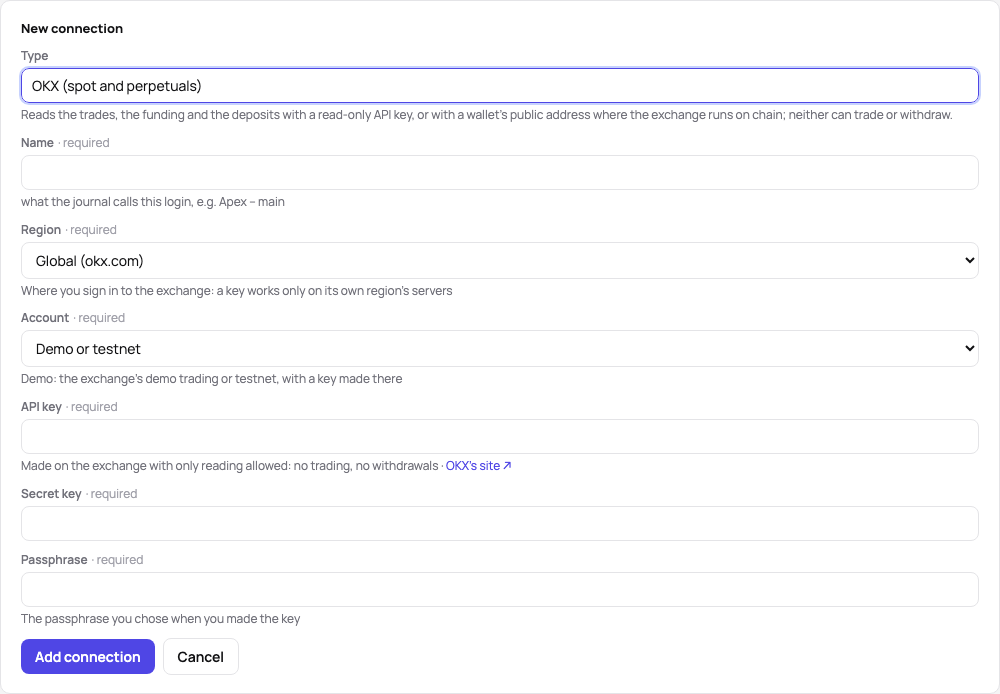
The exchanges read through CCXT ask the same: a key that can only read, made on the exchange. Where to make it, what to allow, and what else the connection asks:
| Exchange | Where the key is made | Allow only | The connection also asks |
|---|---|---|---|
| Binance US | profile menu › API Management | reading; not Enable Spot Trading or withdrawals | |
| BingX | API Management | Read | |
| Bitget | API Key Management | Read-only, with Futures Orders and Holdings and Spot Trade | the passphrase set with the key |
| Bitstamp | Settings › API access | the viewing ones (balance, transactions); confirm the key from Bitstamp’s e-mail | |
| BloFin | API (account menu) | READ; not TRADE or TRANSFER | the passphrase set with the key |
| Crypto.com | Settings › API Keys | Can Read; not Can Trade or Can Withdraw | |
| Delta Exchange | API Management | Read Data; not Trading | |
| Deribit | Account › API | Account, Trade and Wallet on read | Client ID as the API key, Client Secret as the secret key |
| Gate | APIv4 Keys | read-only for every product, withdrawals disabled | |
| Gemini | Settings › API | the Auditor role | |
| HTX | API Management | Read; not Trade or Withdraw | |
| Hyperliquid | no key | the wallet’s public address (0x…): its trades are public | |
| KuCoin | API Management | General; not Trade, Transfer or Withdrawal | the passphrase set with the key |
| MEXC | API Management | the read (view) permissions; none that write | |
| OKX | profile menu › API | Read; not Trade or Withdraw | the passphrase set with the key; Region: Global (okx.com), Europe (my.okx.com) or US (app.okx.com) |
| Phemex | API Management | reading only | |
| Upbit | My page › Open API | 자산조회, 주문조회, 입금조회, 출금조회 (the views) | Upbit wants an IP address: enter TakeJournal’s, 57.131.134.52 |
| WOO X | API (account menu) | Read; not Enable trade |
A key without IP addresses expires after 90 days at MEXC, HTX and BloFin: then make a new one and put it in with Edit. Bitget gives a sync its last 90 days at most: the first one reads no further back. BingX, Bitget, BloFin, Crypto.com, Delta Exchange, Deribit, Gate, Gemini, Hyperliquid, OKX, Phemex and WOO X have a demo or a testnet: choose Account: Demo or testnet and use a key made there.
What each sync reads
Section titled “What each sync reads”Each sync reads the trades since the last one; perpetuals bring their funding. Deposits, withdrawals and transfers come into the account’s ledger, where they move its balance (the ledger), coins at their value of the time in the account’s currency:
- Kraken: the ledger’s deposits, withdrawals, staking and futures transfers, rewards and adjustments.
- Binance: deposits and withdrawals of coins and fiat money, transfers between the spot and futures wallets (a pair on the two accounts) and from the funding wallet; transfers of the last six months only, all Binance keeps.
- Bybit: money moved into and out of the trading account from the funding account, on the spot account (spot and perpetuals share one wallet).
- Coinbase: every wallet’s fiat deposits and withdrawals, coins sent and received, rewards, and the moves to and from Coinbase Pro; the buys, sells and conversions made in the Coinbase app come in as trades. Coinbase Pro’s own trades are no longer in Coinbase’s API: import its fills export.
Keys are stored encrypted, and a key that can only read cannot trade or withdraw. Eighteen more exchanges connect the same way, read-only: Binance US, BingX, Bitget, Bitstamp, BloFin, Crypto.com, Delta Exchange, Deribit, Gate, Gemini, HTX, Hyperliquid (by the wallet’s public address, no key), KuCoin, MEXC, OKX, Phemex, Upbit and WOO X (the other exchanges).
A position the fills do not explain
Section titled “A position the fills do not explain”Hyperliquid tells the position before each fill. Where the journal’s fills do not lead there (a position opened before the history Hyperliquid keeps, or one changed by what the fills do not show), the difference comes in as an estimated fill just before that fill, at its price, so the trade starts where the exchange says. Its result is then an estimate: the trade’s page says so, and you get the alert A missing close (with push and e-mail, Profile › Notifications) and a line on the connection’s card and the account’s page. Check the trade and choose Keep the estimate: the alert ends and the trade counts as it is.
What is not covered yet
Section titled “What is not covered yet”Coin-margined (inverse) contracts, margin borrowing, Kraken Futures and Coinbase’s futures. A trade typed in or imported has a chart only where a connected exchange fetched the bars of its pair at its time: note MFE and MAE of the others by hand.
The AI answers from our guide: how TakeJournal works, imports, prop accounts, the plans.
Your question goes to Anthropic to be answered. We keep the conversation for 30 days to improve the guide, then delete it. No investment advice. Privacy policy