Charts, MFE and MAE
Trader, Pro and Fleet plans, Trader in 1-minute bars; MFE and MAE typed in by hand on Free.
The chart of a trade
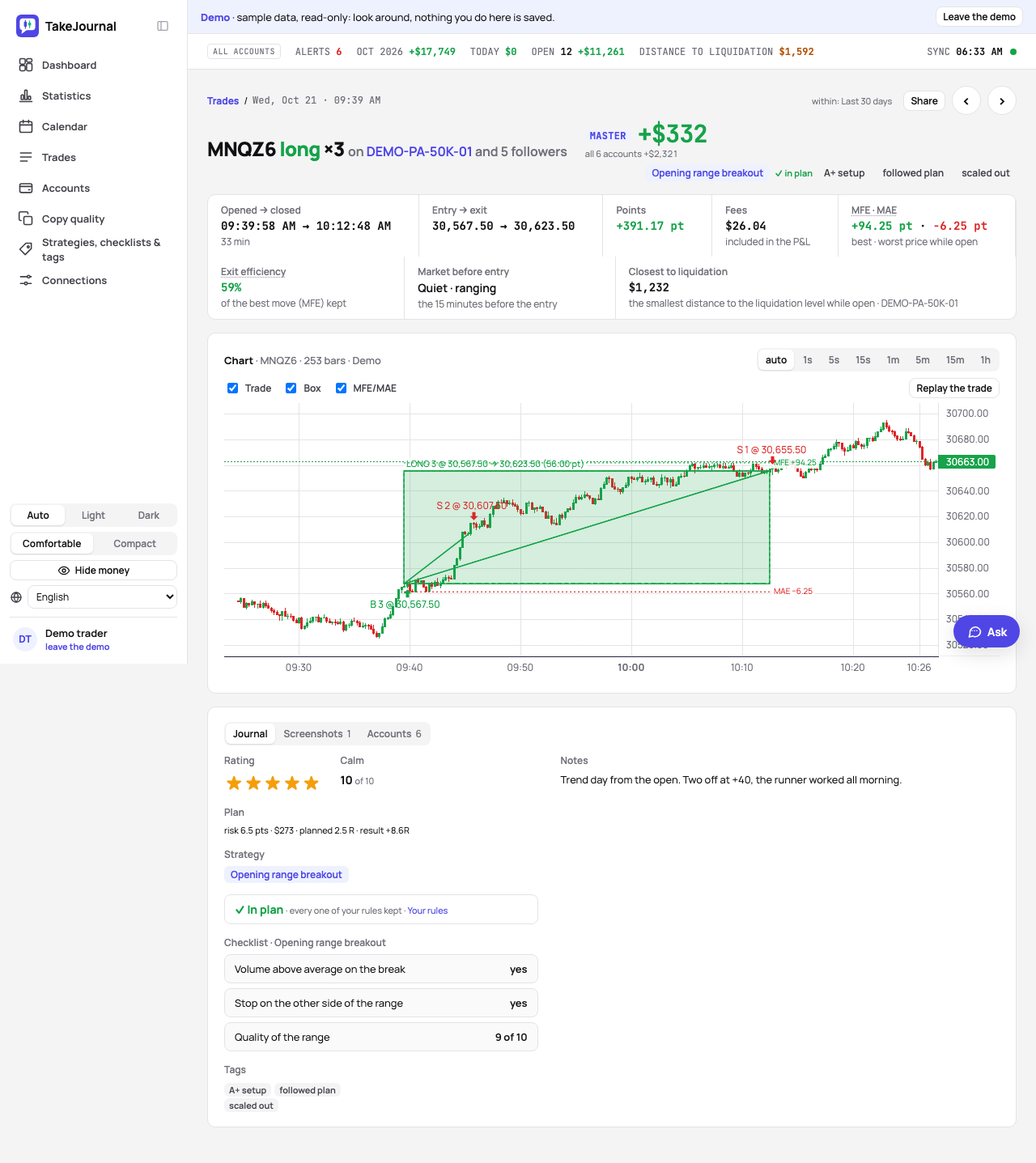
Section titled “The chart of a trade”The page of a trade draws it on the bars of its broker (1-second bars from Rithmic, TopstepX and NinjaTrader 8, 1-minute bars from the crypto exchanges and the forex and CFD brokers; the chart’s note says which) of the minutes around it, at the resolution you pick from 1 second to 1 hour, in your time zone: the fills of every member as markers, the trade box from entry to exit, and the best and worst price. The bars come from the broker’s or the exchange’s history after every sync (Rithmic, TopstepX, OANDA, Capital.com, IG, TradeLocker, MetaTrader through its program, NinjaTrader 8 through its add-on, Binance, Bybit, Kraken, Coinbase and the exchanges read through CCXT), stored per trade; a trade typed in by hand or imported from a file draws the bars one of your connections fetched for the same contract at the same time, and otherwise says that its chart comes soon. A forex or CFD broker’s bar runs from its bid’s low to its ask’s high, so every fill lies inside it; IG counts each minute against the account’s weekly allowance of 10,000 prices. On the Trader plan the chart draws them as 1-minute bars and says so; Pro and Fleet draw the finest the source gives. MFE and MAE are worked out from the finest bars on every plan. Opening a trade’s chart fetches what its minutes still lack at once, and the chart’s note says so until the bars come; the quarter of an hour after the close is fetched once it has passed. A window the broker had no bars for is asked for again once a day while its contract trades, for 30 days. Fills of one side within one bar are one marker with their total, their average price and how many they are. An open trade shows its fills only, with lines for the parts already closed: its box comes when it closes. A minute in which the market had no trade has no bar and stays an empty space on the time axis.
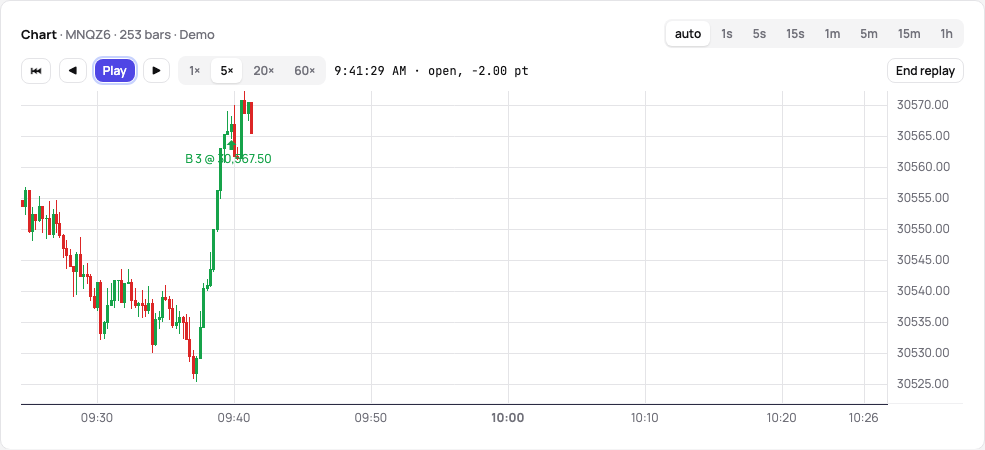
Replay the trade plays it again bar by bar as you saw it, without the end in sight: it starts two minutes before the
entry, draws each bar and each fill once it is reached, and hides the trade line, the box, MFE and MAE and the last
price until you end it. Play and pause, pick 1×, 5×, 20× or 60× real time, step one bar back or forward with the buttons
or the , and . keys, and go back to the first bar; the line beside the controls shows the bar’s time and the trade
before its entry, open with its points, or closed with its result. End replay or Esc draws everything again.
MFE and MAE
Section titled “MFE and MAE”The maximum favourable and adverse excursion — how far the trade went in your favour and against you while it was open — are computed from the bars, in points and in money, and shown on the trade pages and in the exports. From 1-minute bars they are measured to the minute, and the trade page says so. With a planned stop, the trade page also shows the R the trade reached before it closed. Where no market data exists (stocks, options, plans without charts) the trade page takes MFE and MAE typed in by hand, and a later computation never overwrites them. Where there is nothing to draw, the chart folds to one line and the journal takes the width.
Exit efficiency
Section titled “Exit efficiency”The exit efficiency says how much of the best move the exit kept: the move from the entry to the exit over the MFE, in percent. 100% left at the best price of the trade, 0% gave the whole move back, and below 0 the trade lost money after it had been in profit (−100% at most); a trade that was never in profit has none. The trade pages show it beside MFE and MAE, the trades export carries it, and the dashboard’s By strategy card adds each strategy’s average over its trades with an MFE: a strategy that keeps a third of its moves leaves the rest on the table, whatever its result. The average comes with the plans that compute MFE and MAE.
Related
Section titled “Related”The AI answers from our guide: how TakeJournal works, imports, prop accounts, the plans.
Your question goes to Anthropic to be answered. We keep the conversation for 30 days to improve the guide, then delete it. No investment advice. Privacy policy