NinjaTrader 8: the add-on
Trader, Pro and Fleet plans.
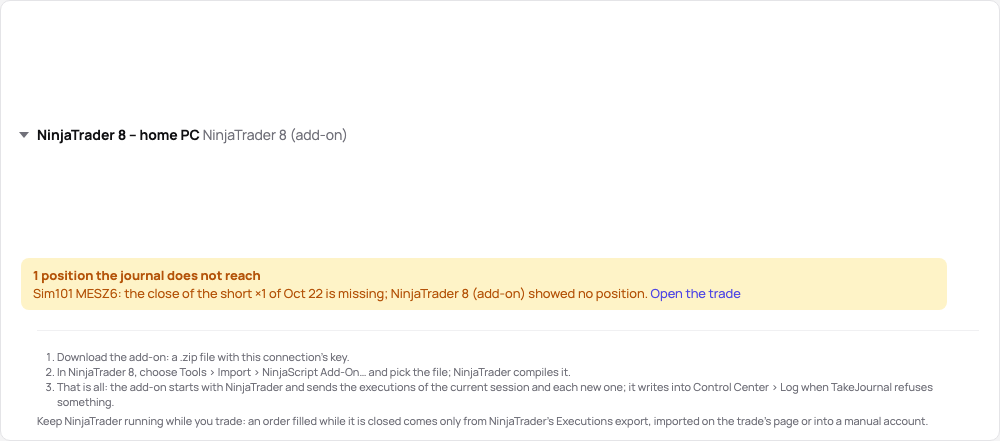
NinjaTrader gives other applications no read-only access to its accounts, so TakeJournal brings a small add-on that runs inside NinjaTrader 8 Desktop. It listens to the executions of every account NinjaTrader is connected to and sends them to your connection: on the NinjaTrader connection (the Tradovate backend), Rithmic, CQG and the others alike. It only reads; it places no order and changes nothing in NinjaTrader.
Add the connection
Section titled “Add the connection”Connections → Add connection, type NinjaTrader 8 (add-on), and a name (the PC it runs on, say). There is
nothing else to fill in. The connection’s card offers Download the add-on: a .zip file with the add-on and this
connection’s key. Each download carries a new key, so an add-on downloaded before stops sending; one connection serves
one NinjaTrader installation.
Install the add-on
Section titled “Install the add-on”- In NinjaTrader 8: Tools → Import → NinjaScript Add-On…, choose the downloaded file. NinjaTrader compiles it and says when it is done; when it asks whether to authorize the add-on TakeJournal, answer Yes. Import it only from your own download.
- That is all: from then on the add-on starts with NinjaTrader and has no window. The connection’s card says when it was last in touch, with how many executions on how many accounts. When TakeJournal refuses something or cannot be reached, the add-on says so once in Control Center → Log, and again when TakeJournal takes the executions again; a newer add-on is announced there too.
To remove it: Tools → Remove NinjaScript Assembly, or delete the connection in TakeJournal, which stops its key.
Keep it running while you trade
Section titled “Keep it running while you trade”Keep NinjaTrader with the add-on running whenever you trade, from before your first order until your last position is closed. NinjaTrader shows an add-on only the executions of its current session: an order filled while NinjaTrader was closed (a stop that filled overnight, a position closed on the phone or in the broker’s web platform) never reaches TakeJournal through the add-on. TakeJournal notices it by the positions (below), but its price and time are then for you to add.
What it sends
Section titled “What it sends”- The executions of the current session when NinjaTrader starts or an account connects, then each new one as it happens. Each batch starts a sync: the trades are in your journal seconds after the fill.
- Accounts as NinjaTrader names them (
Sim101, your prop firm’s account IDs), in the currency NinjaTrader reports. New accounts come in when they fit the plan’s account limit; Choose accounts takes the others. - One fill per order, as the Executions export does: an order filled in parts grows with
each part.
MNQ 12-26becomesMNQZ6. Times in NinjaTrader’s own time zone (Tools → Options → General) are sent as UTC. - Backtests and Market Replay (the accounts
BacktestandPlayback…) stay out. - While TakeJournal cannot be reached, the add-on keeps what waits in
Documents\NinjaTrader 8\TakeJournaland sends it with the next try; nothing is lost while NinjaTrader runs.
The trades’ charts
Section titled “The trades’ charts”Since version 1.1.0 the add-on also sends the bars of your trades’ charts from NinjaTrader’s own history: the data feed NinjaTrader is connected to, or the data it keeps. It asks TakeJournal which trades still lack bars and requests the window around each, from 15 minutes before the entry to 15 minutes after the exit.
- 1-second bars of the last price, so MFE and MAE come to the second. NinjaTrader builds them from the feed’s tick history; where the feed keeps no ticks that old, the add-on sends 1-minute bars, and MFE and MAE come to the minute.
- NinjaTrader need not run during the trade: a past trade’s window fills the next time it runs connected to a data feed. How far back the history reaches depends on the feed; a window it has nothing of stays without a chart.
- It asks only while NinjaTrader is connected to a real data feed, not to the simulated one or to Market Replay.
- An add-on of version 1.0.0 sends no bars: download it again on the connection’s card and import it over the old one.
A missing close
Section titled “A missing close”Since version 1.2.0 the add-on also sends your accounts’ positions: when NinjaTrader starts or an account connects, after each batch of executions, when a position changes and every five minutes. TakeJournal compares them with the position your fills give. Where NinjaTrader holds no position, or another one, while the journal still holds a trade open, a close came that the add-on never got:
- The trade is closed without an exit where NinjaTrader’s positions show it: its exit and result are unknown
(
? (close missing)), so it is left out of your statistics, the calendar and Spotter, and new fills are never paired with it. Without this, the next buy would close your forgotten short and leave a wrong position open. - The trade’s page, the account and the connection’s card say so, and an alert of the kind A missing close comes on the Accounts page, on your devices with notifications and by e-mail; Profile → Notifications switches it off.
- A difference counts from its second report on, so an execution still on its way raises nothing.
Fix it by hand on the trade’s page:
- Add the closing fill: its side, size, price and time; the trade closes with its result.
- Re-import the executions: NinjaTrader’s Executions export of that day (Trade Performance → Executions → Export), chosen there, adds only the executions TakeJournal lacks.
- Close it without an exit: the trade stays closed without an exit and out of your statistics; the alert ends.
When the positions differ in a way no missing close explains (NinjaTrader long 3, the journal long 1), TakeJournal changes no trade: the open trade’s page says what each side shows, and the missing fill is added or re-imported the same way. An add-on before version 1.2.0 sends no positions: download it again on the connection’s card and import it over the old one.
Older executions
Section titled “Older executions”NinjaTrader shows an add-on the current session only. Executions from before the add-on, or from days when NinjaTrader was closed and an order filled at the broker anyway, come by NinjaTrader’s Executions export: Import trades on this connection’s account takes that file only, Import a file on the Connections page finds the account by its number, and a trade’s page offers Re-import the executions. Only the executions TakeJournal lacks are added; the account’s Imports card lists the import with its undo.
Related
Section titled “Related”NinjaTrader 8: import the executions · Tradovate and NinjaTrader web · Brokers and imports
The AI answers from our guide: how TakeJournal works, imports, prop accounts, the plans.
Your question goes to Anthropic to be answered. We keep the conversation for 30 days to improve the guide, then delete it. No investment advice. Privacy policy