Copy quality over time
Pro and Fleet plans.
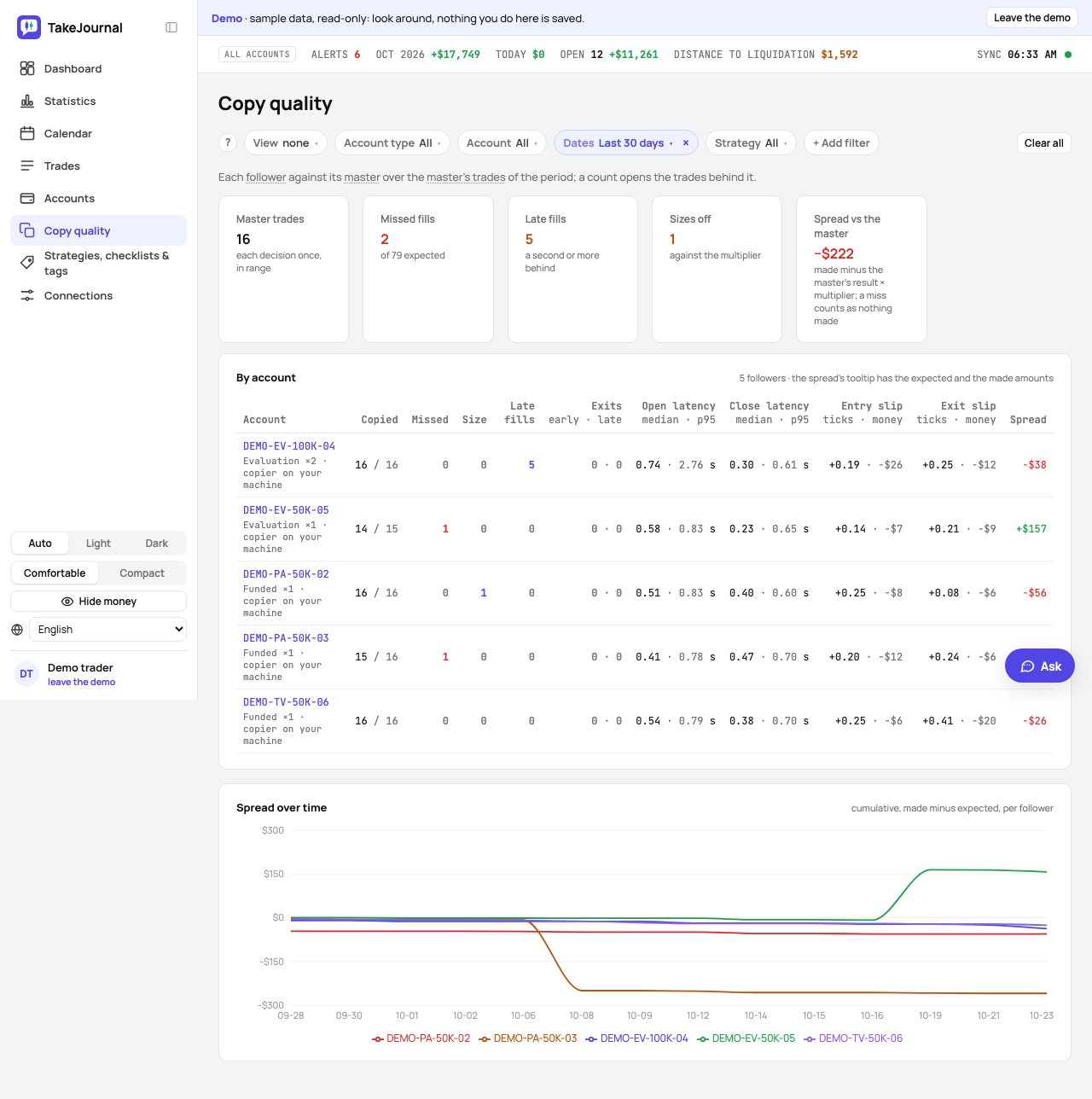
The copy audit on a trade’s page says what the copier did with that one decision. The Copy quality page (in the navigation, under Accounts) says how each account has been doing over a period: which one misses fills, which one fills late, how far apart the accounts’ results drift. The filters are the dashboard’s: the dates, the type of accounts or one account, the market, a strategy, the checklist, tags.
What is counted
Section titled “What is counted”The report is over the master’s trades of the period; a trade the copier took while the master sat out (the audit’s no master warning) is left out and counted in the line above the figures. For each follower:
- Copied / expected — the master’s trades it copied, out of the ones it should have: the copied ones plus the missed ones, as the copy audit flags them (the account was trading by then and has no trade in the master’s trade).
- Size — trades whose size does not match the copy size.
- Late fills — entries filled a second or more after the master’s.
- Exits (early · late) — exits more than a minute before or after the master’s. Those are yours (a follower flattened at the first target, a runner held longer), so they count as decisions, not as latency; the audit on the trade’s page does not flag an earlier exit either.
- Open and close latency — how far behind the master the follower’s fills land, at the entry and at the exit, as the median and the 95th percentile (exits by hand left out).
- Entry and exit slip — how much worse than the master’s price the follower was filled, in ticks per trade and in money over the period; a follower filled better than the master shows a minus.
- Spread — what the follower made minus what the master’s result times the copy size says it should have made, over the closed trades; the two amounts are in the figure’s tooltip. A missed fill counts as nothing made, so a miss on a winning trade widens the spread and a miss on a losing one narrows it.
- Copier (under the account’s name) — which copier produced the fills, read off the latency: fills within 50 ms of the master’s come from a server-side copier (Rithmic’s, switched on by the firm), and such an account shows misses and sizes rather than late fills; fills further behind come from a copier on your machine.
Every count opens the trades behind it, each with a link to the master’s trade and to the account’s own trade.
The spread over time
Section titled “The spread over time”The chart adds up each follower’s spread by trading day, so a follower drifting away from its master shows as a line bending away from zero, while a follower on a server-side copier stays near it. With one account chosen, the report shows that account; with the master chosen, every follower of it. A follower’s page links here with the account already chosen.
Related
Section titled “Related”The AI answers from our guide: how TakeJournal works, imports, prop accounts, the plans.
Your question goes to Anthropic to be answered. We keep the conversation for 30 days to improve the guide, then delete it. No investment advice. Privacy policy