AI reviews of your days and weeks
The week’s review on Trader and above, a day’s on Pro and Fleet and in the 7-day trial. Neither counts as an AI answer.
A review looks back at a week or a day the way a trading coach would: what went well, what did not, one or two things to change, and questions for you to answer in your notes. It sits at the top of the week’s or the day’s page (open one from the calendar), above your own notes.
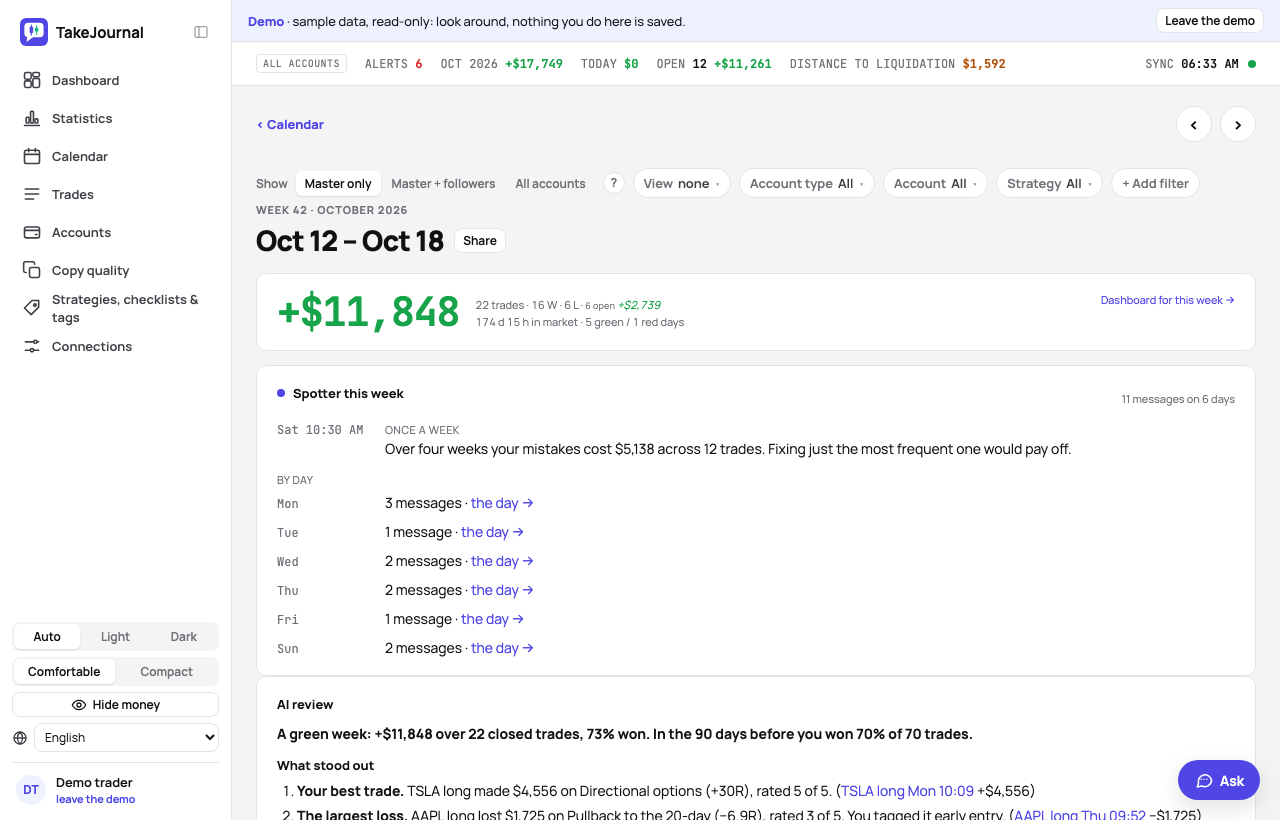
The week by itself, a day on the button
Section titled “The week by itself, a day on the button”- The week is reviewed by itself after its last session, early on Saturday (06:10 UTC), for every week in which you closed trades, once you switch on Review every week by itself in Profile → Notifications (off for a new account). Trades synced or imported later on the weekend are picked up by a run in the afternoon or on Sunday, as long as the week has no review yet. With the switch off, the week’s page offers Review this week.
- When it is ready: on Saturday and Sunday the dashboard says Your AI review of last week is ready with Open the review, which opens the week’s page, until you have opened the review there. In the calendar a week with a review carries ✦ AI before its number (✦ alone on a phone).
- A day is reviewed when you press Review this day on the day’s page.
- Review this week again (or this day) writes the review once more, for instance after you journaled the trades or imported the rest of the week; the line under a review says when trades closed after it was written.
What a review reads
Section titled “What a review reads”The AI reads the same journal you see: the period’s closed trades with their notes, tags and tag categories (the cost of mistakes), the checklist answers, the plan and R, MFE and MAE, rating and calm; your notes on the day or the week; the period’s statistics against the same figures over the 90 days before it; your prop accounts’ firm rules and distance to liquidation; on Fleet, what Spotter told you during the period, so it can say whether you heeded it; and the previous review, so it can tell whether last week’s changes were kept. Each point links the trades it rests on; a link opens the trade.
The review covers what the page shows without a filter: every account. Filtered to simulation accounts, the page shows a separate review of your simulations, written on the button.
It is written in your profile’s language, or in your browser’s when the profile names none; the weekly review of a profile without a language is in English. It only reads: nothing in your trades or notes changes. It reviews your own execution and gives no investment advice, signals or forecasts.
Your review to edit
Section titled “Your review to edit”Edit review turns the review into text you can change: correct it, answer its questions, add what it missed. It saves when you leave the field (⌘ S too). An edited review is never replaced by the weekly run; Review again replaces it, and the message that follows offers Undo to bring your text back.
Plans and AI answers
Section titled “Plans and AI answers”The week’s review comes with Trader and above, a day’s with Pro and Fleet; the 7-day trial shows both. Neither costs an AI answer (those pay for the AI chat and the AI import), whether written by itself or on the button, within a fair number a day. The demo shows sample reviews of its last weeks, written by the app from the demo’s figures.
What is sent
Section titled “What is sent”With each review, the period’s journal described above goes to the AI. Account numbers and names are replaced by
placeholders (ACC-12) before anything leaves the server and shown again in the review. The AI provider does not use
these requests to train its models and does not keep them after answering (privacy policy). The review is
kept in your journal like a note and goes into the backup with it.
Related
Section titled “Related”Calendar and notes · Ask your journal · The journal of a trade
The AI answers from our guide: how TakeJournal works, imports, prop accounts, the plans.
Your question goes to Anthropic to be answered. We keep the conversation for 30 days to improve the guide, then delete it. No investment advice. Privacy policy