Master and followers: one trade on many accounts
Every plan; the copy audit on Pro and Fleet.
A trader with a copier takes one decision and the copier executes it on every account. TakeJournal builds the same picture: the fills of each account become that account’s trade, and the trades that belong to one decision fold into one trade, the master’s, with the followers’ trades attached to it. The lists, the calendar and the statistics count the decision once (Master only, the first position of the Show switch in the filter bar) or every account’s trade (All accounts). The technical name of a trade folded over its accounts is a logical trade; the screens say trade, the exports and the API keep the name.
Master only counts a decision with the master’s result: its P&L, size, fees and R are the master’s trade’s, and the money of all the accounts shows next to it (“+$1,394 on 6 accounts”). With several accounts chosen (a type, a firm, a set of accounts), it shows the decisions those accounts took part in, each still counted with the master’s trade even when the master’s account is outside the filter, and the money of the chosen accounts next to it; a decision without a master counts with its first trade on the chosen accounts. With exactly one account chosen you see that account’s own trades, master and followers ignored. A decision stays open while any of its trades on the chosen accounts is, so a follower left open still shows. The trade’s own page shows every account with the sum over them.
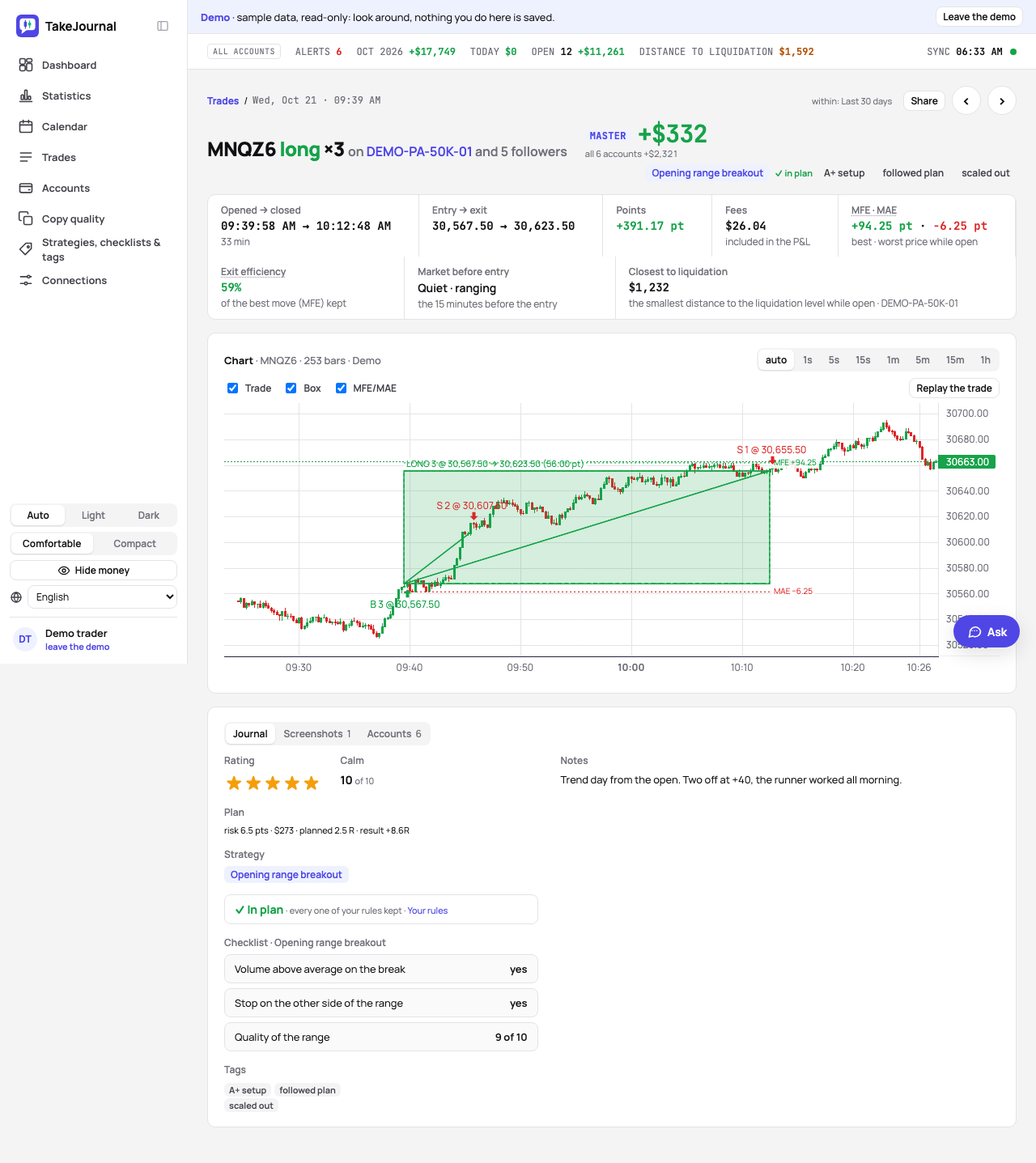
Master and followers
Section titled “Master and followers”On the Accounts page every account has a role: the master the copier copies from, a follower with its copy size (× the master), or a single account (the words). The master’s trade anchors the decision; the followers attach by time and instrument.
Copy trading… at the head of the Accounts page sets the roles in one dialog: every account in use with its role, a follower’s size, and why. TakeJournal proposes the roles from the fills: an account that repeats another’s fills within seconds at a steady size is its follower at that size, and the account whose fills come first is the master (“repeats Mock master 42’s fills at 2× (66 of 66, within a second)”). The proposals are filled in; change any role or size, and Save the roles sets them all at once, with Undo in its message. One master per connection: choosing another one makes the old master a follower. An account’s ⋯ › Copy trading… opens the same dialog with that login’s accounts.
When a sync brings accounts that repeat another’s fills and the roles do not say so yet, a bar on the Accounts page names them, with Set the roles…; Later hides those proposals on this device. A proposal looks at the last 90 days of the accounts of one connection: at least five fills of the follower, four in five of them repeating the master’s within the copy tolerance (5 seconds), most of them at one size.
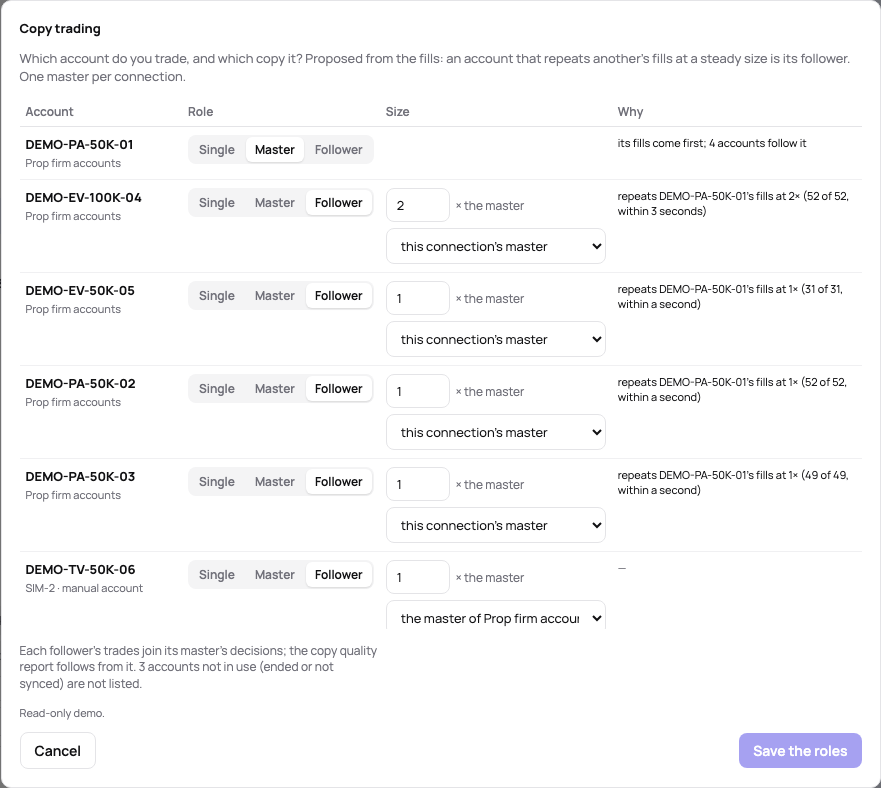
Followers on the master’s own connection (the same Rithmic login, for instance) need nothing more than the role and the copy size.
Setting the roles after you journaled loses nothing. When two trades become one (the master marked afterwards anchors trades that stood apart) or a follower’s trade joins the master’s later (a fill corrected by the next sync), the note of each is appended, the tags, checklist answers and screenshots are added, and the rating, calm, plan and strategy fill in only what the joined trade lacks.
Followers on another connection or from files
Section titled “Followers on another connection or from files”Pro and Fleet.
A copier often reaches further than one login: the master on Rithmic, followers at Topstep on TopstepX, followers on Tradovate or NinjaTrader accounts whose fills come in as file imports. Each such follower has to say whose master it follows, or its trades stay trades of their own. In Copy trading… (on the Accounts page, or in the follower’s ⋯), the follower’s row:
- Role — Follower.
- Size (× the master) — the follower’s size relative to the master: 1 when both trade 2 contracts, 0.5 when the follower trades 1 of the master’s 2.
- The master it copies, under the size — the master of the connection the master syncs on (its name, as on the Connections page). The default, “this connection’s master”, is right only for a follower on the master’s own login.
- Save the roles.
Saving regroups at once, the past trades included; there is no need to wait for the next sync or import. From then on every sync and every imported file joins the follower’s trades to the master’s, with the copy audit. Set up each follower this way, all of them in one save: a TopstepX login with three accounts needs the setting on all three. The proposals stay within one connection; a follower on another login is set by hand.
A follower set up after you journaled its trades keeps that journal: when its trade joins the master’s, the journals merge as above. A trade the master did not take stays a trade of its own, journal included.
When a follower does not join
Section titled “When a follower does not join”In the Trades list, the master’s trade counts its accounts (“on 20 accounts”); a follower that did not join shows as a row of its own next to it, with the same instrument, direction and time and “1 account”. Open that account’s page and check the three settings above. The usual causes:
- Follows the master of is left on “this connection”: a manual account (file imports, trades by hand) or another login has no master next to it, so the follower groups with nothing.
- The role is still Single, as every new account starts.
- The setting is not on the page at all: followers across connections come with Pro and Fleet.
A wrong copy size does not split the trade; the follower joins and its size shows as a size differs warning.
TakeJournal says so too: a follower whose connection has no master gets a sentence under its name on its page and in Copy trading…, and the Accounts page marks it no master next to its role. A manual account’s row in Copy trading… starts on “choose a connection…”, since its own connection never has a master.
The copy audit
Section titled “The copy audit”With the audit, every trade carries warnings when the followers do not match the decision:
- missing — an account that trades did not take this one;
- size differs — a follower’s size does not match its copy size;
- no master — no master’s trade anchors the group.
Different exits are not a fault: a follower flattened earlier, at the first target or at break-even, is risk management, so it carries no warning; the Accounts tab shows every account’s exit.
The Accounts tab of the trade’s page lists each account’s entry, exit, result, the closest it came to its liquidation level, and the latency: how far behind the master the follower filled.
The trend per account over a period — which account misses fills, which one fills late, the latency, the slippage and how far each follower’s results drift from the master’s — is the Copy quality page.
Related
Section titled “Related”The words TakeJournal uses · The journal of a trade · Copy quality over time · Account settings and the distance to liquidation · The dashboard
The AI answers from our guide: how TakeJournal works, imports, prop accounts, the plans.
Your question goes to Anthropic to be answered. We keep the conversation for 30 days to improve the guide, then delete it. No investment advice. Privacy policy