Rithmic (coming soon): connect and sync
Coming soon. Trader, Pro and Fleet plans.
TakeJournal signs in to Rithmic with your login, read-only, and reads the order history and the executions of every account behind it: fills with their fees, balances and open P&L, the risk settings of the account (auto-liquidation threshold, loss limit) and, for the charts, 1-second bars around every trade. It never places, changes or cancels an order. Rithmic keeps no history of deposits and payouts: a change of the balance that the trades do not explain goes into the account’s ledger as money seen in the balance.
Add the connection
Section titled “Add the connection”Connections → Add connection, type Rithmic. Each field says under it what it wants; the required ones are marked.
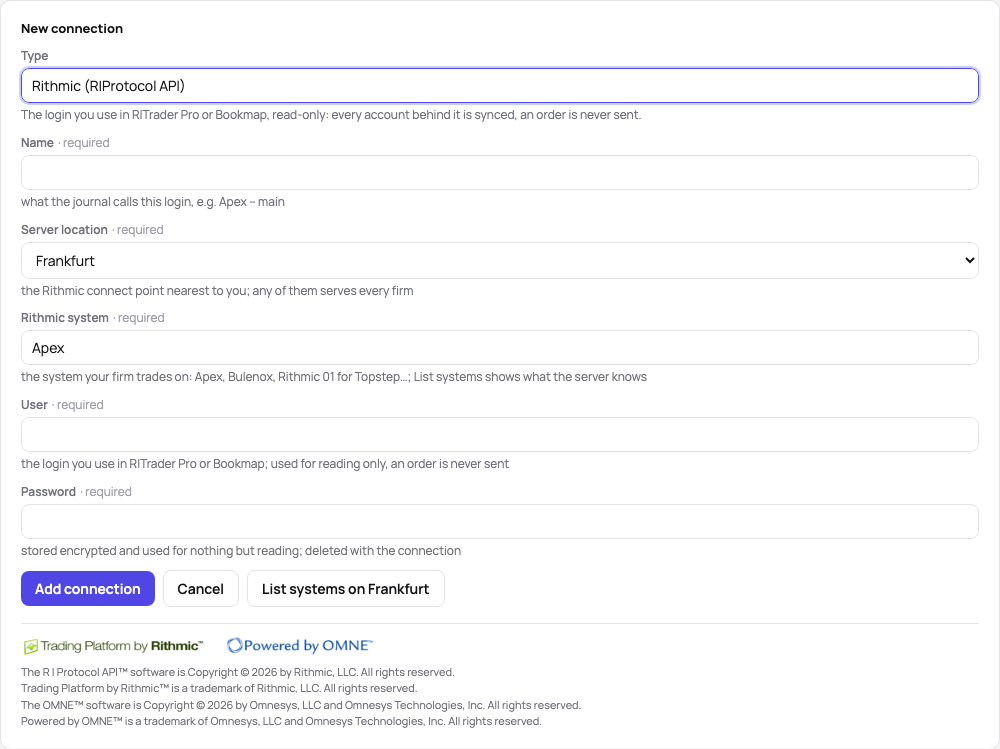
- Name — what the journal calls this login, for example
Apex – main. - Server location — the Rithmic connect point nearest to you; any of them serves every firm.
- Rithmic system — the system your firm trades on (for example
Apex,Bulenox,Rithmic 01for Topstep,Rithmic Paper Trading). List systems on Frankfurt (or the location you chose) asks the server and puts the names it knows into the field’s suggestions. - User and Password — the same login you use in R|Trader Pro or Bookmap. They are stored encrypted and used for nothing but reading; delete the connection and they go with it.
Add connection (or Enter in any field) stores the connection and runs the first sync: the message says “first sync running…”, the connection’s card shows the accounts and fills as they arrive, and the sync’s end comes as a message with Show report. Esc closes the form; when something was typed, it asks first. Each connection counts against the plan’s broker logins.
Choose the synced accounts
Section titled “Choose the synced accounts”A login often carries more accounts than you trade. When more accounts arrive than the plan has room for, a dialog opens to pick the ones in use; later, Choose accounts on the Accounts page (your manual accounts are in the same choice: your plan’s accounts). Unchecking a broker account deletes its trading data from TakeJournal (the broker keeps its own); checking it again brings the history back with the next sync. A passed evaluation stops syncing once its successor is set, and so does an account you mark as ended, passed, failed or cancelled (Account settings): it leaves the choice and the plan’s limit and keeps its trades.
An account the broker no longer lists (a failed evaluation the firm closed, for example) is never deleted: TakeJournal marks it “not at the broker since” the first sync without it, stops syncing it, keeps its trades and asks on the Accounts page how it ended. Should the broker list it again, the mark goes.
Syncing
Section titled “Syncing”On Fleet, while TakeJournal is open in a tab and the futures trade (Automatic sync at the top of the Connections page, on until you switch it off; the strip at the top then says AUTO), TakeJournal keeps one session signed in to Rithmic: a fill comes in as soon as Rithmic reports it, and a sync runs at least every 30 minutes besides. The session signs out ten minutes after the last page closed or the futures closed; a sync runs once more after Friday’s close and the daily halt, then not until the open, as Rithmic often maintains its servers then, and a closed page syncs nothing. If Rithmic does not let the session stay signed in (too many sessions on your login), the sync runs every 5 minutes instead. Any other sync signs in, reads what is new and signs out again. Sync now on the dashboard or the Connections page runs one at once, on every plan; when another of your syncs is running it waits, and the button reads “Queued” until it starts. While it runs the button reads “Syncing…”, the connection’s card counts the accounts and the new fills, and the SYNC cell of the strip at the top says “running…”; the end comes as a message, “Sync done: 3 accounts, 412 new fills”, with Show report. Every run leaves a report in the sync history: its status in a word (done, failed, running) and, per account, the fills fetched, the new ones and the ones already known. An automatic sync that found nothing new says nothing, and the history keeps the latest of them, marked automatic. Reports → Test login on the card checks the login and names the accounts behind it without syncing anything.
The first sync reads the order history Rithmic keeps (the last days of every account); older trades come in through a file import of the R|Trader Pro order history, which recognises the fills the sync already has.
Each sync also reads every account’s positions from Rithmic and compares them with your fills, so a close the history left out is found. A missing close →
Rithmic’s notices in the app
Section titled “Rithmic’s notices in the app”While you have a Rithmic connection, every page of TakeJournal ends with Rithmic’s artwork and copyright notices, and the connection form shows them as soon as you choose Rithmic: Rithmic asks this of every application that connects to it.
Related
Section titled “Related”Master and followers · Account settings and the distance to liquidation · Brokers and imports


The R | Protocol API™ software is Copyright © 2026 by Rithmic, LLC. All rights reserved.
Trading Platform by Rithmic™ is a trademark of Rithmic, LLC. All rights reserved.
The OMNE™ software is Copyright © 2026 by Omnesys, LLC and Omnesys Technologies, Inc. All rights reserved.
Powered by OMNE™ is a trademark of Omnesys, LLC and Omnesys Technologies, Inc. All rights reserved.
The AI answers from our guide: how TakeJournal works, imports, prop accounts, the plans.
Your question goes to Anthropic to be answered. We keep the conversation for 30 days to improve the guide, then delete it. No investment advice. Privacy policy