Import and sync reports, reconciliation
Every plan with a sync or an import.
A journal that silently misses or doubles a fill shows a wrong P&L without anyone noticing. TakeJournal keeps a report of every run and compares, per day, what the source reported with what the journal holds.
The report of a run
Section titled “The report of a run”Connections → Sync history: every run with its time, result and a details line. Per account: the fills fetched, the new ones, the ones already known, and the accounts left out and why (over the plan’s limit, inactive). An import’s report adds the file’s format, the zone assumed, and the rows that could not be read, each with its line, the reason and the row’s text; the rest of the file is imported. The history comes in pages of fifty runs (25 or 100 to choose), newest first, with the total beside the pages and the choice of a connection above the list.
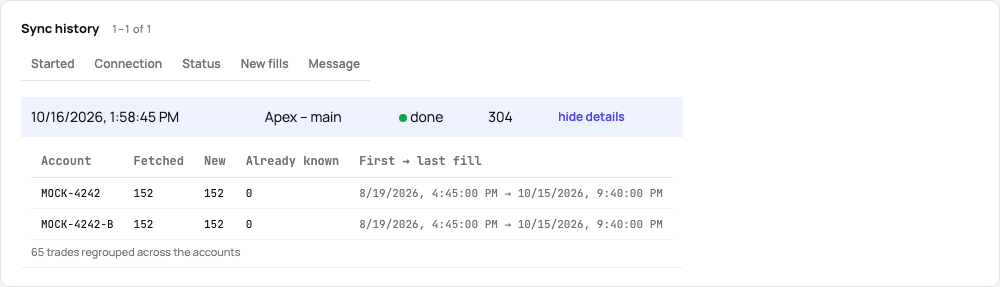
An import into a manual account shows the same under Imports on the account’s page.
Revert an import
Section titled “Revert an import”A wrong import (the wrong account of the file, the wrong zone) is reverted as a whole for 30 days: Revert on its row under Imports, or in Recent changes on the Trades page. The dialog first says what happens: the fills the import added are deleted and the account’s trades rebuilt; a trade that keeps fills on other accounts stays with its notes, tags and screenshots, and one made of the import’s fills alone goes, with its journal, which the dialog counts. Fees the import filled in on fills that were there before are cleared again, and the reconciliation’s day counts go back to what they were before. An import waits while its fills were edited since, or its trades got fills added by hand (they would stay as a trade of their own), or a later import changed them, which is reverted first; the dialog names the trades. Importing the file again brings the fills back. Broker syncs cannot be reverted: the broker’s report is the source.
Download a file again
Section titled “Download a file again”Every file an import reads is kept with the import, compressed. Under Imports on the account’s page, the file’s name downloads it as you imported it, with its size beside it; a table pasted into the import dialog is kept as the CSV it became. The files count in your plan’s storage (Profile → Plan and billing → What you use). Delete file in its row deletes a file for good after asking; the import, its trades and its report stay. A reverted import keeps its file, so it can be corrected and imported again. The files go with the account they went into, with a start over and with your TakeJournal account. An import made before the files were kept shows its name only.
Reconciliation
Section titled “Reconciliation”Every run records, per account and UTC day, how many fills the source reported. The Reconciliation card on the account’s page compares that with the fills the journal holds and lists the days that differ. “N days checked, in order” means every day agrees. A day with fewer fills in the journal than reported usually means a fill was deleted on purpose or a file did not cover the whole day; import the day’s file again. A day with more means an import added fills the broker did not report in that run.
Related
Section titled “Related”The AI answers from our guide: how TakeJournal works, imports, prop accounts, the plans.
Your question goes to Anthropic to be answered. We keep the conversation for 30 days to improve the guide, then delete it. No investment advice. Privacy policy