Trades by hand, fills, deleting
Every plan; a manual account counts towards the plan’s account limit like any other.
A manual account
Section titled “A manual account”An account without a broker connection: its trades are typed in or imported from files (the words). New trade on any page creates it on the way when you have none, Import a file on the Connections and the Accounts pages does the same for a file, and Accounts → New account › My own account or A practice account creates one on its own with its name, type and currency (a new account). A manual account has settings, a ledger and a distance to liquidation like any other, it can follow a master synced elsewhere, and it counts towards the plan’s account limit like a synced one (your plan’s accounts).
A trade by hand
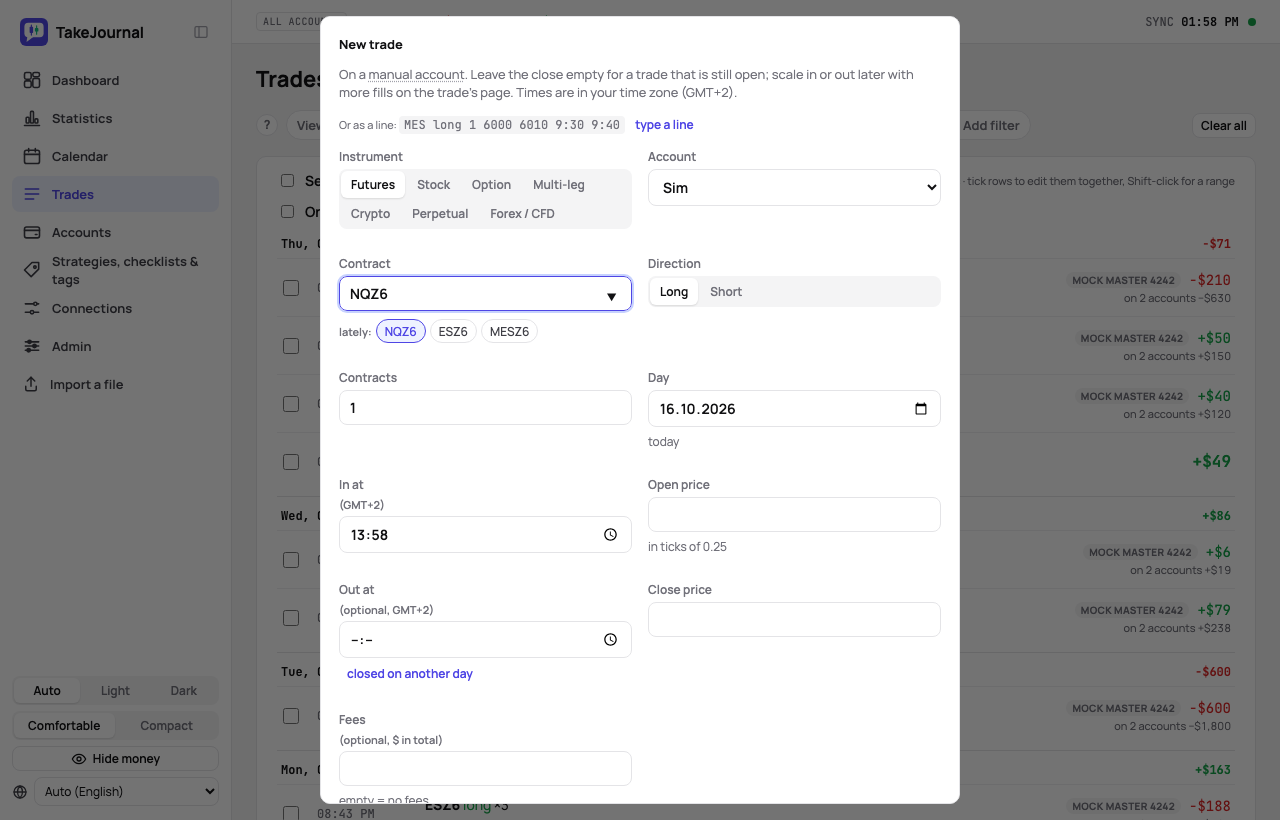
Section titled “A trade by hand”New trade on the Trades page or the account’s page: the contract, the direction, the contracts, the open and (optionally) the close with their prices and the fees. The open and the close become two fills; on the trade’s page you add further fills to scale in or out, and you change or delete any fill. Times are in your zone, named after the fields. Each field explains itself under its box (the fees’ standard rate, the tick, the multiplier); Save trade says what it still waits for, and a close with only its time or only its price is marked on the field. Esc or Cancel closes the dialog and keeps what you typed as a draft until you leave the page: the dialog opens with it again and offers to discard it.
The dialog starts on the account of your last trade typed in, the contracts lately traded are one click beside the
field, the day is today unless you change it and the times are hours and minutes, the close on the same day unless you
say closed on another day; the button shows the result before you save (Save trade · +$48). type a line takes
the trade in your words — MES long 1 6000 6010 9:30 9:40: the symbol (a root takes the contract you lately traded on
it), long or short, the quantity, the prices in and out, the times and a day such as 2026-10-13 — and fills the fields
for you to check before saving. Options and strategies keep their own fields.
When the account already holds the symbol at those times — a trade still open, or one whose times overlap yours either way — the dialog says so above the button: the two would net into one position built from their fills, as a broker nets them, with other prices and results than you typed, so the button shows no result. Choose another account or Change the times, or save anyway. A trade that closes at the minute another one opens nets with it too; one that opens at the minute another one closes does not.
- Stock — a ticker (with suggestions), shares (a fraction too, to six decimals, as Robinhood or Fidelity sell them) and the stock’s currency (the account’s unless you choose another: a Xetra stock in euros), a price move of 1.00 = 1.00 of it a share.
- Option — the underlying, expiry, strike, call or put, the multiplier; an open option’s page ends it: expired worthless, exercised or assigned, which opens the underlying at the strike.
- Crypto or Perpetual — the pair as the exchange writes it (BTC-USDT), a quantity with decimals; a spot pair is long only, a perpetual goes both ways. See crypto.
- Forex / CFD — the symbol as the broker writes it (EUR/USD, XAUUSD, US30.cash), lots with two decimals, the contract size and the quote currency prefilled, the swap with the close. See forex and CFDs.
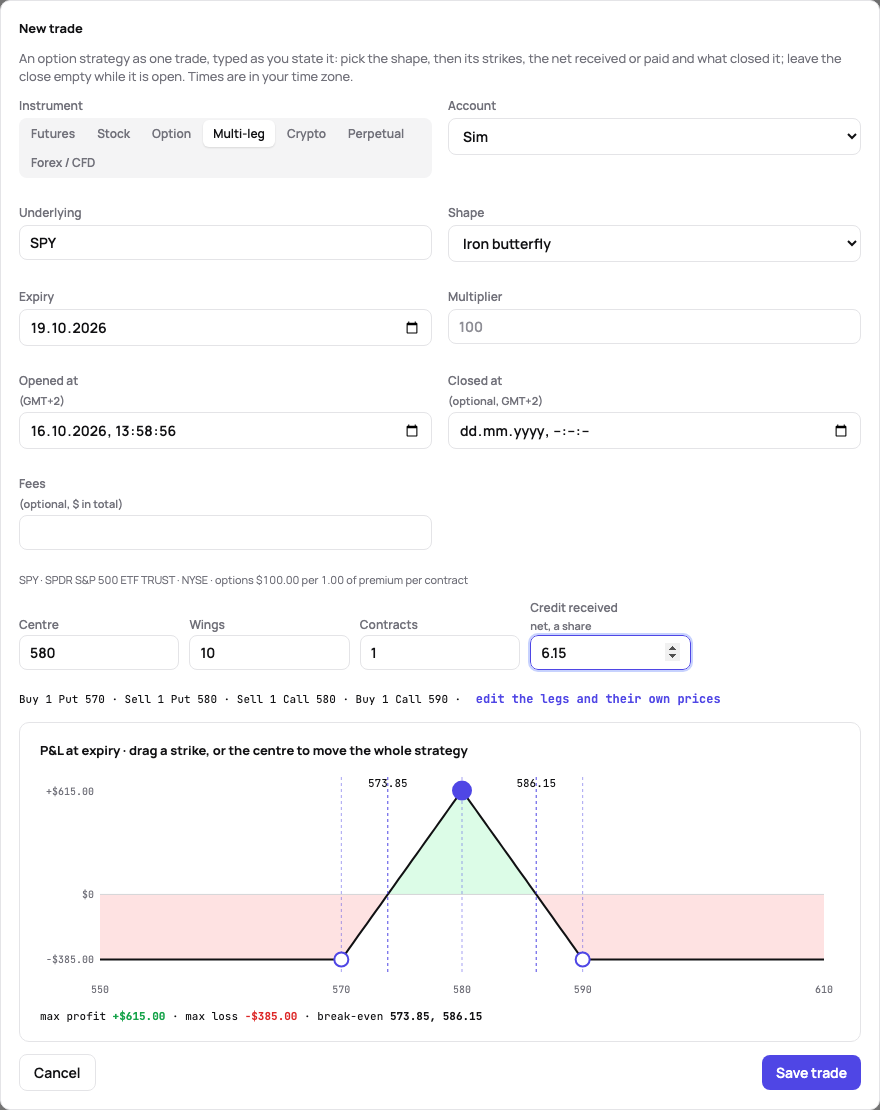
- Multi-leg — a strategy of two to eight legs (vertical, iron condor, calendar, covered call and others, or custom), one trade with the P&L at expiry drawn while you type. A vertical, a straddle, a strangle, an iron condor, an iron butterfly, a butterfly and a calendar are typed by their parameters, as you state the trade: an iron butterfly its centre and wings (10, or 10 / 15 for a broken wing), a vertical its direction, long strike and width, an iron condor its short strikes and wings, a calendar its strike and the two expiries; then the contracts, the credit received or the debit paid a share, and what was paid or received to close. The legs are listed as they follow, with the closed result, and the P&L at expiry is drawn. The legs’ prices are a split of the net, so the strategy’s result is exact (its Legs tab says so); edit the legs and their own prices keeps the legs’ grid for a trade whose legs you have priced one by one. Once the first strike is typed, the wings (a vertical’s width, an iron condor’s short call too) are placed at the distance you last used on that underlying, else at one from the strike’s level, and the field says which; type over them to change them. On the chart each strike can be dragged, by the pointer or with the arrow keys: the centre moves the whole strategy, a leg alone moves that leg (a broken wing), and the fields follow.
Option strategies from your fills
Section titled “Option strategies from your fills”Options filled together become one multi-leg trade by themselves, whatever brought them: a file or a broker’s sync. Legs belong together when they opened in one order (a combo order) or within 5 seconds of each other on one underlying, the shares or the future among them; each leg’s later fills stay with it until it is flat. The shape is recognised from the legs (vertical, straddle, strangle, iron condor, iron butterfly, butterfly, calendar, diagonal, covered call, protective put, collar); anything else is a custom strategy. The fills the journal already had were looked at once.
A leg opened on the underlying within 5 minutes after one of the strategy’s fills (a leg rolled or added), or a whole strategy opened within 5 minutes after it closed legs (rolled out), stays in it. The strategy’s Legs tab says where it came from, lists each leg with when it opened and closed and the leg it was rolled into; while legs are open, the P&L at expiry is drawn for them with what the closed ones made. Split into single legs there makes each leg a trade of its own, and recognition leaves them single afterwards; the message offers Undo. On the Trades page, tick the single trades of one account and one underlying and choose Join as one strategy in the bar; its message offers Undo too.
Option curves before expiry and the Greeks
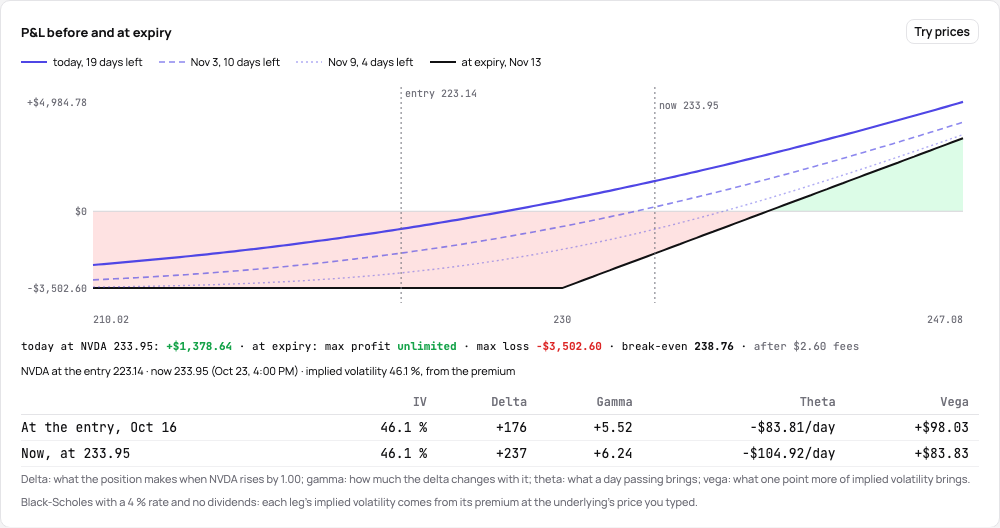
Section titled “Option curves before expiry and the Greeks”On an option trade’s or a strategy’s page (Trader and up), the chart draws the P&L before expiry over the line at expiry: for an open position today’s curve and two dates on the way, for a closed one the curves at the entry and the exit. A calendar or a diagonal is drawn to its first expiry, the later legs at what the model says they are worth then.
The values come from a model: Black-Scholes for an option on a stock (a 4 % rate, no dividends), Black-76 for an option on a futures contract. It needs each leg’s implied volatility, which TakeJournal works out from the premium paid or received once it knows where the underlying was:
- Edit prices takes the underlying’s price at the entry, and at the exit or now. A strategy with the shares or the future among its legs has the price at the entry and the exit already.
- Under the chart, each leg’s implied volatility at the entry and at the exit, and the position’s delta, gamma, theta and vega there and now.
- A volatility of your own, for the whole position or with Each leg its own prices and volatility for each leg, draws the curves with it: the chart redraws while you type and Save keeps it. Left empty, the volatility from the premium is used. The demo redraws what you type without saving it.
The Greeks are the position’s: delta is what it makes when the underlying rises by 1.00, gamma how much the delta changes with it, theta what a day passing brings and vega what one point more of implied volatility brings, in the account’s money.
Merging and splitting trades
Section titled “Merging and splitting trades”A trade is built from its fills, from flat to flat. Where that is not how you see it, change it by hand:
- Merge — tick two or more trades of one instrument and one direction that follow one another on the Trades page and choose Merge into one trade in the bar. The dialog shows the trade they make and its result; the journals join (the notes one after the other, the tags, checklist answers and screenshots together; the first trade’s rating, strategy and plan stay).
- Split — on a trade’s Fills tab, Split here at any fill but the first cuts the trade there: the fills before make one trade, that fill and the ones after it another. The position open before the fill is handed over at its price without a fee, so the two make what the one made; the Fills tab notes the handover. The journal stays with the first trade.
Both apply to every account of the trade, the master and its followers alike, also on accounts synced live: they are kept on the fills, so no sync or import undoes them. The message offers Undo, and so do Recent changes for 30 days (the notes, tags, rating and strategy go back; screenshots and checklist answers stay where a merge put them); after that, Take off beside the mark on the fill (merged here, split here) takes it off. An option strategy is joined and split its own way, above.
Fixing an import, deleting
Section titled “Fixing an import, deleting”On every account without a live broker sync (manual accounts) any fill can be changed or deleted and a trade, on one account or on all of them, deleted; a deleted imported fill comes back with the next import of its file, and nothing comes back twice. An account synced live from the broker refuses edits: the broker’s record is the truth, and the next sync would bring the fill back anyway.
Edit fill and Delete fill sit on the fill’s row of the Fills tab; Delete trade is the last thing on an account’s trade page, under the tabs, and in ⋯ at the head of the trade’s page across its accounts, with The fills. On that page a trade on one manual account takes a correction where it shows: a click on its entry or exit price edits the fill in place, Enter saves it with Undo in the message and Esc leaves it; a side of several fills opens the fills instead. Move to another account… in that ⋯ takes a trade typed into the wrong manual account (a strategy with all its legs) to another of yours, with its journal, checklist answers and screenshots; the message offers Undo. A trade whose fill also opens or closes another (a flip) is changed on the Fills tab first. Both deletes ask first, in a dialog that counts what goes (the fills, the notes and screenshots when nothing is left of them) and names its button by the action: a fill or a trade cannot come back once deleted. The same dialog asks before a connection is deleted with its accounts and trades; what can come back (a screenshot, a tag, a strategy) is deleted at once with Undo in the message at the bottom instead.
When a change would net the trade with another of the account — a fill’s time moved into or across another trade of the symbol, a size after which the trade no longer closes and the later trades join it, or a move to an account that holds the symbol at its times — Edit fill or the move dialog says so before you save, naming that trade: the two would become one position built from their fills, with other prices and results than the trade has now. Change it back, choose another account, or save or move anyway.
Related
Section titled “Related”The AI answers from our guide: how TakeJournal works, imports, prop accounts, the plans.
Your question goes to Anthropic to be answered. We keep the conversation for 30 days to improve the guide, then delete it. No investment advice. Privacy policy