Firm rules — daily loss, consistency, payouts
On Trader and above.
Prop accounts fail evaluations and lose payouts on rules other than the trailing drawdown: the daily loss limit, the consistency rule (how large the best day may be), the minimum trading days, the payout conditions. TakeJournal keeps those rules per account and shows, from your trades, where the account stands against them.
Where an account stands
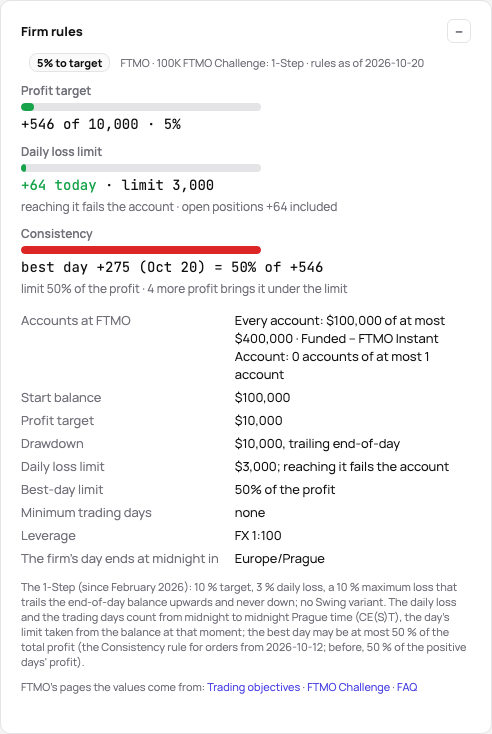
Section titled “Where an account stands”Accounts → the account → Firm rules. The card opens with one word — in progress (an evaluation shows its percentage to the target), passed, failed, locked today or payout ready — and the rules one by one, each with a gauge:
- Profit target — the profit since the start against the target. A consistency rule can raise it: when the best day is larger than its share allows, the profit needed becomes the best day divided by the share (a $2,000 day under a 50% rule needs $4,000), which is how Topstep and Take Profit Trader state it.
- Daily loss limit — today’s result, open positions included, against the limit, and what reaching it does: the day ends (most firms) or the account fails.
- Consistency — the best day of the period, its share of the period’s profit (or of the target), and the profit that still dilutes it under the limit. The period starts the day after the last payout, as the firms reset it there, else at the first trade.
- Trading days — the days that count towards the minimum (a day with a trade, or a day of a minimum P&L where the firm requires one).
- Activity and Time limit — the days without a trade against the firm’s activity rule, and the day of an evaluation’s time limit, each with its last day.
- Trading hours — the trades held past the firm’s flat-by time, and a position open now with the minutes left.
- Hold time — the trades held less than the firm’s minimum, every one, half of them or on average.
- News — the trades opened or closed (or held) within the firm’s minutes of a high-impact US release, what they cost, and today’s releases.
- Contracts — today’s limit against the day’s largest position; with tiers, the tier the profit at the day’s start reached and what the next one allows; a trade over the limit named with its day.
- Payout — ready with the amount available (the profit above the reserve, at most the cap), or what is still missing in words: “2 more days of $200+”, “the best day is 53% of the period’s profit, the limit 50%: $100 more profit dilutes it”, “$600 below the balance a payout needs ($52,600)”, “5 more days until the period ends”.
The Accounts page carries the same word per account and the most pressing figures next to it — today’s loss against the limit, the target, the best day’s share, the first thing a payout needs — so the whole desk is read at a glance.
A trading day is the session day of the futures markets (18:00 New York time to the next 17:00), as the brokers and the firms date it, so the daily figures match the firm’s. Today’s loss uses the broker’s own day figure where the broker reports one this session (Rithmic), else today’s closed trades and the open positions at their latest price.
Setting the rules
Section titled “Setting the rules”Firm product in the Firm rules card lists Apex Trader Funding, Topstep, MyFundedFutures, Bulenox and Take Profit Trader, each with its account sizes and stages (evaluation and funded; Topstep’s two payout paths, Bulenox’s Option 1 and Option 2, MyFundedFutures’ Rapid, Rapid EOD, Pro and Builder, Take Profit Trader’s Test, PRO and PRO+), and the forex firms FTMO (the 2-Step’s two phases, the 1-Step, the FTMO Account after each, the Instant Account), FundedNext (Stellar 2-Step and 1-Step), FundingPips (1 Step, 2 Step, 2 Step Pro, Zero), The5ers (High Stakes, Hyper Growth, Bootcamp), E8 Markets (E8 One, E8 Signature) and Fintokei (ProTrader, SwiftTrader, StartTrader), their limits as percentages of the starting balance turned into money. Apply sets the account type, the start balance (kept when already set), the profit target and the drawdown, and the rules, and says so in a message with Undo. The card then lists the product’s values in words — Profit target $3,000, Drawdown $2,000, trailing intraday, Daily loss limit none — instead of a form; Another product brings the picker back. Change the rules opens the inputs to type your own values over the product’s: a field that differs from the product shows the product’s value under it (“template: $1,000 · use”), and once the card is saved (Save, ⌘S too) the list is back with yours; the product: $1,000 beside such a value, so you see which numbers are the firm’s and which your own; an empty field is no rule. Without a product, type the firm’s values: the daily loss limit and what reaching it does, the best-day limit (the consistency rule) with its base, the minimum trading days and the profit a day needs to count, the trading days per payout and the profit a payout day needs, the payout period in calendar days, and behind More rules the minimum and the maximum payout, the payout’s share of the profit (Topstep’s funded accounts pay at most half the balance), the safety net above the start, your share of a payout, the maximum contracts and the zone the firm’s day ends in. Once saved, your values show as the same list, with Change the rules to type again. Every field carries the account’s currency or its unit and a line in the firm’s words. The products are in dollars and apply to accounts in dollars; on an account in another currency type the firm’s values.
Many firms sell add-ons with a product at checkout: a daily loss limit, a 50% best day, a larger drawdown, a higher split or faster payouts. A product that has them shows Options bought with it under the picker and in the new account’s wizard: tick what you bought, and Apply takes their values as the product’s. The card names them beside the product (+ a daily loss limit of $1,200), the list shows Options bought with the ones you did not buy, and their values carry no yours mark. Under Change the rules the same boxes turn an option on or off later.
Under the drawdown rule, Trailing stops says where a trailing level stops rising: at the start balance (Topstep, Alpha Capital One, BrightFunded 1-Step), at the start + an amount (Apex’s funded accounts: $100) or at the first payout (Lucid Flex); empty, the level keeps trailing. The products bring it, and the distance to liquidation follows it. A box under it, the first payout moves it there at once, is for firms that set the level there at the first payout, wherever it was (Topstep’s XFA at the start, MFFU Builder at the start + $100).
Some firms change a payout’s rules with its number. Behind More rules, Payout steps holds them as rows, each from its payout on until the next row: the profit since the last payout the payout needs (in money or as a share of the start balance), the most it pays, your share, the best day’s limit and the days it needs; an empty cell keeps the value above it, in the first row the rule’s own field. Lucid Direct asks $1,500 of profit for the first payout and $1,250 for each later one; Top One Instant 6%, 5%, then 4% of the start; Bulenox Fast Track lets the best day be 20%, 25%, then 30% of the cycle’s profit. The card’s Payout row then names the payout (2nd payout), asks its profit (“$750 more profit since the last payout: the 2nd payout needs $1,250 of new profit”) and gives its cap and share. Your share by the amount is a split in two parts: Topstep pays 100% of the first $10,000 of all payouts and 90% after, Earn2Trade 50% of a withdrawal below $1,500 and 80% from $1,500 (counted per payout); the second share is the account’s own.
Every firm of the catalogue has its page on the site, with its account types and the rules TakeJournal checks on them: Prop firms.
Many accounts of the same product at once: tick them on the Accounts page, Edit in the bar, and choose the product under Firm product in the bulk edit (it shows for an evaluation, a funded or a live account). It fills in the account type, the firm, the start balance (where no ticked account has one yet), the profit target and the drawdown, so you see them before you apply, and sets the rules on every ticked account; a value you change after it, a profit target of your own for example, wins. Its message’s Undo puts back the settings and the rules each account had, as long as they were not changed since. Account settings
Every firm in the list is dated: the day its pages were read, with links to those pages under the rules. When a firm changes a rule, TakeJournal updates the list and dates the change, and the account’s page says what changed since you applied the template — apply it again for the new values, or keep your own. A product the firm no longer sells leaves the list; accounts that use it keep their values. The rules as read on 2026-10-06 (the futures firms) and 2026-10-09 (the forex firms):
| Firm | Evaluation | Funded |
|---|---|---|
| Apex Trader Funding (accounts since 2026-03-01) | Intraday Trail: no daily loss limit; EOD Trail: a daily loss limit that ends the day; one day can pass; no consistency rule | 5 days of a minimum profit ($100–350 by size and type), the best day under 50% of the profit since the last payout, the safety net (drawdown + $100) kept, $500 to a per-payout cap, at most six payouts, every payout in full |
| Topstep | Combine: the maximum loss limit on the end-of-day balance, an optional daily loss limit that ends the day, the best day at most 55% of the target (else the target rises), two days | Express Funded Account: 5 winning days of $150+ (Standard) or 3 days under a 40% consistency (Consistency path), $125 at least, half the balance at most |
| MyFundedFutures | Rapid, Pro: the best day under 50% of the profit, two days; Rapid EOD: 30%, four days; Builder: a daily loss limit that pauses the day, one day | Rapid: daily payouts above the buffer; Pro: every 14 calendar days, $1,000 at least; Builder: every 48 hours under a 50% consistency |
| Bulenox | Option 1: trailing, no daily loss limit; Option 2: end-of-day with a daily loss limit that pauses the day; no minimum days, no consistency rule | Master Account: ten trading days a period, the best day at most 40% of the period’s profit, the reserve kept, $1,000 at least, a cap on the first three payouts |
| Take Profit Trader | Test: three days, the best day under 50% of the net profit (else twice the best day is needed), no daily loss limit | PRO: daily payouts from day one above the buffer (the drawdown); PRO+: a live account, 90% |
| FTMO | 2-Step: 10% then 5% target, 5% daily loss, 10% maximum loss on the initial balance, 4 days, no consistency rule; 1-Step: 10% target, 3% daily loss, a 10% maximum loss trailing the end-of-day balance, the best day at most 50% of the total profit (accounts bought from 2026-10-12; older ones: 50% of the positive days’ profit, which TakeJournal checks as the stricter total) | FTMO Account: the losses of its Challenge, payouts every 14 days, 80% (90% with the scaling), after the 1-Step the best day at most 50% of the total profit; Instant Account: funded at once, 3% daily loss, a 10% maximum loss trailing the highest balance, the best day at most 30% of the total profit, 90% |
| FundedNext | Stellar 2-Step: 8% then 5%, 5% daily, 10% maximum, 5 days a phase; Stellar 1-Step: 10%, 3% daily, 6% maximum, 2 days | Every two weeks after the 2-Step (the first 21 days after activation), every 5 business days after the 1-Step, 80% |
| FundingPips | 1 Step: 10%, 3% daily, 6%, 3 days; 2 Step: 8% then 5%, 5% daily, 10%, 3 days; 2 Step Pro: 6% and 6%, 3% daily, 6%, 1 day; Zero: funded at once, 3% daily, 5% trailing | Master: rewards every two weeks at 80%; Zero: 7 profitable days a cycle, 95% |
| The5ers | High Stakes: 10% then 5%, 5% daily, 10%, 3 profitable days; Hyper Growth: 10%, a 3% daily pause, 6%; Bootcamp: 6% a step, 5% | High Stakes Pro Trader: every two weeks from 14 days after activation, $150 at least, 80% and up |
| E8 Markets | E8 One: 6%, 3% daily, 6% trailing; E8 Signature: 6%, an end-of-day drawdown of 3–4% | E8 One: on demand, the best day at most 40%, 80%; Signature: 5 profitable days, the best day at most 35% |
| Fintokei | ProTrader: 8% then 6%, 5% daily, 10%, 3 profitable days; SwiftTrader: 6%, 2% daily, 3%; StartTrader: 2, 3 and 6%, 3% daily, 6% | ProTrader account: every two weeks, 80%; SwiftTrader 90% |
The values are read from the firms’ own pages and are not the firms’ word; the firm’s dashboard decides (FundingPips’ and E8’s pages refused the read on 2026-10-09, so their values come from listings of May and August 2026, as their notes say). Report a rule that moved so the list can follow.
A forex firm’s day is not the forex trading day: FTMO resets the daily loss at midnight Prague time, FundingPips at midnight UTC+3. Such a product names the zone (The firm’s day ends at midnight in, behind More rules: the market’s trading day by default, the catalogue firms’ zones named, any other zone by its name), and the account’s days and “today” are counted by it, so the daily loss and the trading days read as on the firm’s dashboard; leave the field on the market’s trading day for a firm on Eastern European server time, whose midnight is the New York close.
Activity and time limit
Section titled “Activity and time limit”Two rules count days rather than money. The activity rule is the longest the firm lets an account go without a trade — FundedNext, Maven and Alpha Capital 30 days, Alpha Futures 10 trading days, Tradeify and Take Profit Trader’s PRO a week; past it, the firm closes the account. The card’s Activity row counts the days since the last trade (or since the account’s start before the first one) and names the last day a trade keeps the account; from three quarters of the days used the badge says trade by that day, and an alert and Spotter’s morning say it too. The time limit is how long an evaluation may take from its start — Apex 30 days, FXIFY Lightning 5 trading days, Fintokei’s StartTrader 180 days: the Time limit row shows which day of it the account is on and its last day. An evaluation not passed by then counts as failed, and so does an account that went longer without a trade than the firm allows. Both count calendar days or trading days (Monday to Friday), as the firm does, and a reset starts them again; the products bring them, and behind More rules you type your own.
Some firms make the first payout wait longer, or less, than the later ones: BrightFunded 30 days from the first trade, then every 14; FundedNext 21, then 14; FXIFY on demand after the first funded trade. The first payout period (behind More rules; 0 for “from the first trade”) holds for the first payout, the payout period for the rest, and the Payout row counts the one that holds now.
Maven’s Instant Mini gives 24 hours from the first trade: a time limit counted in hours from the first trade runs from that trade, and the Time limit row shows the hour it is in and the end’s time. FundedNext’s 1-Step and Maven’s funded accounts count their payout periods in trading days (5 and 10): the Payout period’s unit holds for the first period too, and the Payout row counts trading days.
Trading hours
Section titled “Trading hours”Many futures firms want every position closed by a time of day: Alpha Futures by 4:20 PM New York, Earn2Trade by 3:50 PM Chicago, Phidias by 9:59 PM UTC, Bulenox’s Option 1 by 3:59 PM Chicago; no overnight holds is the same rule at the session’s close (5:00 PM New York), and some forex firms forbid only weekend holds (FunderPro and Funded Trading Plus: flat by Friday 4:30 PM New York). Flat by (behind More rules) takes the time, its zone and every day or Fridays only; Held past it says what the firm does with a position still open then. The card’s Trading hours row lists the trades held past the time with how long, and a position open now with the minutes left; from half an hour before, the badge says flat by the time and an alert warns, also as a push notification. Where the firm closes the position itself the account goes on and the row shows it in red; where the firm counts it as a breach, the account counts as failed from that day.
Some firms let a little stay open overnight instead: The5ers Futures Swing 1 mini or 10 micros at the session’s close, FundingPips Zero nothing without its Swing add-on. Overnight (behind More rules) takes the contracts, 0 for nothing; the card’s Overnight row lists the closes held over it and the position open now, and an alert warns half an hour before the close.
Hold time
Section titled “Hold time”Some firms want trades held a while: TopOne’s Ignite every trade 10 seconds, Maven at least half the trades 60 seconds (150 on OMO and Instant Mini), Alpha Capital an average over 2 minutes, BrightFunded counts a trading day only with a trade open a minute. Hold time (behind More rules) takes the seconds and whether every trade, at least half of them or their average must reach them; Days count only with a trade held that long makes the minimum trading days count such days only. The card’s Hold time row counts the closed trades held less and names the latest; an alert says it the day it happens. The account goes on: the firms take such trades’ profit or refuse the payout, so the row is a warning to read before you ask for one.
BrightFunded allows shorter trades and only counts the day: choose only for the trading days, and the row shows how many trading days had a trade held that long, with no warning for a short trade.
Many firms want no trading around high-impact news: Maven’s challenge, TopOne and Alpha Futures 2 minutes either side, BrightFunded, FundingPips, E8 and Alpha Capital 5, Lucid Daily 1 minute with no position open, Take Profit Trader’s PRO accounts a minute around FOMC, NFP and CPI only. News (behind More rules) takes the minutes, the releases (every high-impact one, or FOMC, NFP and CPI only) and what breaks the rule: a trade opened or closed in the window, or any position open in it. A trade in the window says what the firm does: removes its profit (TakeJournal then takes it off the progress to the target and the payout available; a loss stays), fails the account from that day (unless the evaluation had passed before), counts the profit only in part (FundedNext 40% of the news trades’ profit, Maven OMO at most 0.5% of the balance per release), or a warning only.
The releases come from the economic calendar, the official US calendars, so a release touches the markets in dollars: a pair with the dollar on either side, US futures and indices, gold and oil, US stocks, crypto against the dollar; other currencies’ news is not in the calendar yet. Only fills are known: a stop or a target filled in the window counts, an order placed and cancelled in it does not. The card’s News row lists the trades in a window with the release and what they cost. On a release day the badge names it from the morning, Spotter’s morning brief names the window, and a position still open a quarter of an hour before it raises an alert, also as a push notification.
Alpha Capital’s Swing accounts allow news trades that last: a trade opened 2 minutes either side of a release must stay open over 2 minutes. Choose a trade opened in it lasts longer than its minutes; the row then lists only the trades closed too soon, with how long they were held, and an open position raises no alert.
Contracts by profit
Section titled “Contracts by profit”Several firms raise the contracts, and some the daily loss limit, as a funded account’s profit grows: Apex’s PA 50K allows 2 contracts and $1,000 a day, 3 from +$1,500 above the start and 4 with $2,000 a day from +$3,000. Contracts by profit (behind More rules) takes the tiers as rows — from a profit on, the contracts and the daily loss; an empty cell keeps the tier above —, Micros whether 10 micros (MNQ, MES and the other micro futures) count as one contract, as at most firms, or each as one, and A position over the limit what the firm does then. The tier is the one the profit reached at the day’s start, as the firms count it. The card’s Contracts row shows today’s limit against the day’s largest futures position, the trades open together added up, and what the next tier allows; the daily loss row takes the tier’s limit. A position over the limit is named with its day and an alert says so; where the firm refuses or closes such an order the account goes on, where it counts as a breach the account counts as failed from that day. A maximum contracts without tiers is checked the same way.
Payouts until live
Section titled “Payouts until live”Some firms count the payouts an account makes: Apex’s funded accounts pay six times, E8 Futures four, Lucid Flex five, and ETF moves an account to Live Elite after $25,000 paid out. Under the payout period, Payouts until live or the end holds the count or the total and what follows, the firm moving the account live or the account ending. The card’s Payout row says which payout comes (payout 3 of 6), Spotter’s morning brief names the last one, and once it is made the row says no payout is due on the account. Payout cap by new profit caps a payout at a multiple of the profit since the last one (TopOne, Tradeify and FTMO Futures twice, E8 Signature once). Payouts per period counts the payouts and the amount in a calendar month or in a number of days (Alpha Futures four a month, Maven $10,000 in any 30 days), and a payout waits while the period is full. Fees and payouts says with which payout the fees you paid come back (FundedNext and FXIFY with the first, Maven with the third) or what the firm takes off the first payout (Earn2Trade’s $139); recording the payout as received proposes the amount with them.
Some firms pay a reward besides the payouts: FundedNext 15 % of the evaluation’s profit at the first scale-up, Phidias $1,000 when the account switches to live. Reward from the firm (behind More rules) keeps the share or the amount and when; the list and the Payout row name it. It is shown only: TakeJournal doesn’t add it to the payout.
Accounts at a firm
Section titled “Accounts at a firm”Firms limit how many accounts you may hold with them at once, or how much capital: Topstep five Express Funded accounts and one Live Funded, Take Profit Trader five funded accounts, MyFundedFutures ten evaluations, FTMO $400,000 across every account and one Instant Account. The catalogue keeps these limits with the firm. When you choose a product in the new account’s wizard, or under Product on an account’s page, TakeJournal counts the firm’s accounts running in your journal (those not ended) and says where the new ones bring you. Over a limit it warns and names the running accounts; you can still create the account, since the firm may hold it until another one ends and your journal may not know every account you have. The firm rules card lists each limit with the count, Funded: 4 accounts of at most 5 accounts.
Some limits hold only while another account runs: Topstep closes the Express Funded accounts when a Live one opens, Tradeify and TradeDay sell no new evaluation beside a Live account (Tradeify keeps no funded one either), MyFundedFutures allows three funded accounts once one is 100K or 150K, Alpha Futures three once one is Advanced. The card names such a limit as applying once you run that account, and the warning says so when the account that starts it is the new one.
Leverage and scaling
Section titled “Leverage and scaling”Forex and CFD firms give a leverage per asset class, FTMO 1:100 on currency pairs and less on indices, metals and crypto, and many grow a funded account that keeps making money: FTMO adds 25 % of the start every four months with 10 % profit and two payouts, FunderPro 50 % after three months of 10 %. Under More rules, Leverage holds 1:N for FX, metals, indices, energies and crypto; the rules list shows it and the new account’s wizard names it with the product. The platform’s margin enforces it, so TakeJournal only shows it. Scaling holds the profit in % of the start, the window in months counted from the account’s start, the payouts it needs, the growth in % of the start and the largest balance. The card’s Scaling row shows the window’s profit against the profit needed, the payouts and the size the account grows to; when both are there, an alert says the account can scale. Ask the firm for the new size, then set the new start balance under Edit.
More checks
Section titled “More checks”A few firms watch more. Live after profit moves an account live after a profit since the start or one day’s profit (Lucid Daily after a day of $6,000, Phidias when the target is reached again); the Payout row counts toward it. Payout at most, % of the start caps every payout (Blue Guardian Nano 2 %). The consistency rule can count the best trade instead of the best day (Maven Instant Mini). Positions checks one position at a time, or no long and short at once (Maven Instant Mini, Apex’s legacy PA), and the card counts the trades opened against it. Profit giveback follows ETF’s Elite rule: from 20 % profit, giving back more than 35 % of the accumulated profit from its peak can remove the account. Payouts do not lower the accumulated profit; the card’s row shows it with its peak and the floor, and an alert says when it falls below.
Risk per trade
Section titled “Risk per trade”Some firms limit what one trade may lose: FunderPro’s Instant accounts 2 % of the start per trade idea, Maven a trade’s floating loss 1 %. Under More rules, Risk per trade holds both shares. TakeJournal counts each closed trade’s loss and, where the trade’s chart gives it, its worst open loss (MAE). The card’s Risk per trade row shows the worst trade against the limit and the trades over it with the latest day; the Floating loss row shows the worst open loss and how many trades have no chart. An alert says when a trade goes over.
Payout day and daily cap
Section titled “Payout day and daily cap”Bulenox and Earn2Trade pay out on Wednesdays: under More rules, Payout day holds the weekday, and the card’s Payout row names the next one. A payout’s cap in % of the start can change with the payout’s number: FunderPro’s Instant accounts pay at most 5 % of the start for the first two payouts, Maven 6 % for the first and 8 % after; the Payout steps table has a column for it (100 % lifts the cap). E8 Pro counts at most 2 % of the start a day toward the target: Daily cap toward the target holds it, and the card’s Profit target row counts only the capped days and says which day made more.
Alerts
Section titled “Alerts”TakeJournal watches every account in use against its limits and tells you before a rule breaks, and when there is good news:
- Distance to liquidation — the distance down to the warning share of the drawdown allowance (75% used by default), and the level itself.
- Daily loss limit — today’s loss, open positions included, at the warning share of the limit, and the limit reached.
- Best-day rule — the best day over the consistency limit.
- Activity and Time limit — the days without a trade at the warning share of the firm’s limit, an evaluation’s time limit running out, and each rule broken.
- Trading hours — a position open half an hour before the firm’s flat-by time, and one held past it.
- Hold time — a trade of today held less than the firm’s minimum, or too many of them.
- News — a position open a quarter of an hour before a high-impact release’s window, and a trade in a window today.
- Contracts — a position over the day’s contract limit.
- Payout ready and Target reached — a payout can be requested, an evaluation’s target is met.
- A missing close — on every plan, not only for prop accounts: your broker shows a position your fills do not reach, and the trade it concerns is closed without an exit (A missing close); it comes by e-mail too.
A new alert comes as a message on whatever page is open, with Open account. The strip at the top of every page counts the alerts that hold, in the colour of the worst, and leads to the list at the top of the Accounts page:
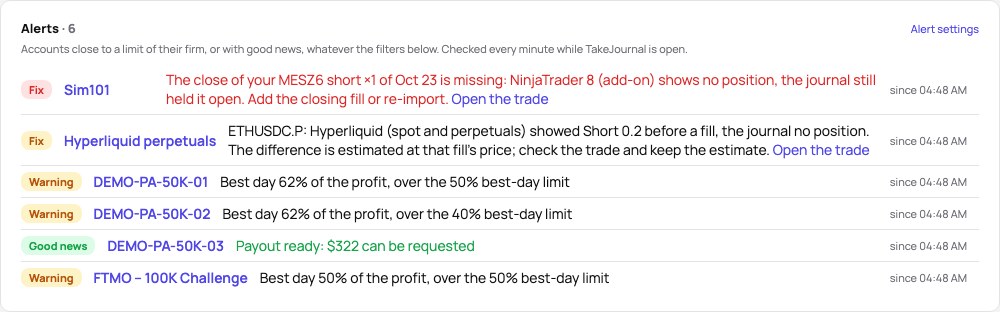
Dismiss puts an alert away until its condition ends, with an undo; the dismissed ones are a click away under the list. The accounts are checked whenever a page opens, and every minute while TakeJournal is open in a tab or a device of yours takes the notifications; a daily loss alert belongs to its trading day and comes again on another day.
Profile → Notifications → Alerts: the share of a limit that warns (50 to 90%), the kinds you want, and On this device: a notification of each new alert, also while TakeJournal is closed. Each phone and computer has its own choice (the browser asks for your permission first), and Send a test reaches all of them. The notification names the account and what happened, without amounts, since it shows on a lock screen; a tap opens the account. On an iPhone or iPad it works in the installed app (The app); a browser without push notifications shows them while TakeJournal is open in a background tab. Logging out stops them on that device. On Fleet, Spotter’s messages come to the same devices.
Chance to pass
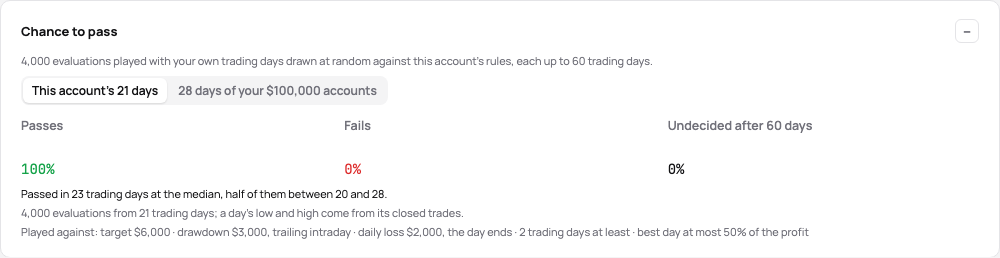
Section titled “Chance to pass”An evaluation’s page shows its chance to pass: 4,000 evaluations played with your own trading days, drawn at random with replacement, against the account’s rules, each up to 60 trading days. The rules are the account’s: the profit target and the drawdown of its settings (static, trailing at the day’s end or intraday, as the distance to liquidation reads it), and the firm’s daily loss limit (the day ends at it, or the account fails), minimum of trading days and consistency rule.
- Passes, Fails and Undecided after 60 days — the shares of the evaluations; the fails split into the drawdown and the daily loss limit.
- Passed in … trading days — the median of the passed evaluations and the middle half of them.
- Days drawn from — this account’s own days, or the days of all your accounts with the same start balance (one size, one scale of money; a day copied onto several of them counts once). It needs at least 5 trading days; with fewer of its own, the card takes its size’s.
A day’s low and high come from its closed trades, so a trade’s swing while open is not in them. Set the target and the drawdown in the account’s settings first; it comes with Pro and Fleet.
Related
Section titled “Related”Account settings and the distance to liquidation · Fees, payouts and the lineage of an account
The AI answers from our guide: how TakeJournal works, imports, prop accounts, the plans.
Your question goes to Anthropic to be answered. We keep the conversation for 30 days to improve the guide, then delete it. No investment advice. Privacy policy